

Review AI-Detected Policy Gaps
Who can use this feature
- Supported on Foundation, Growth, and Scale plans
Scrut Teammates proactively evaluates your uploaded policies and highlights specific gaps in the policy content. It surfaces gaps based on:
- Missing coverage for specific control requirements
- Outdated or incomplete policy language
- Sections that need to be added or revised to meet framework expectations
The guidance reflects your current audit period and framework context, so recommendations stay relevant as your compliance scope changes.
Before You Begin
- Ensure that Scrut Teammates is enabled for your account.
How Does It Work?
-
Click Compliance → Policies on the left navigation panel, and open any policy.
-
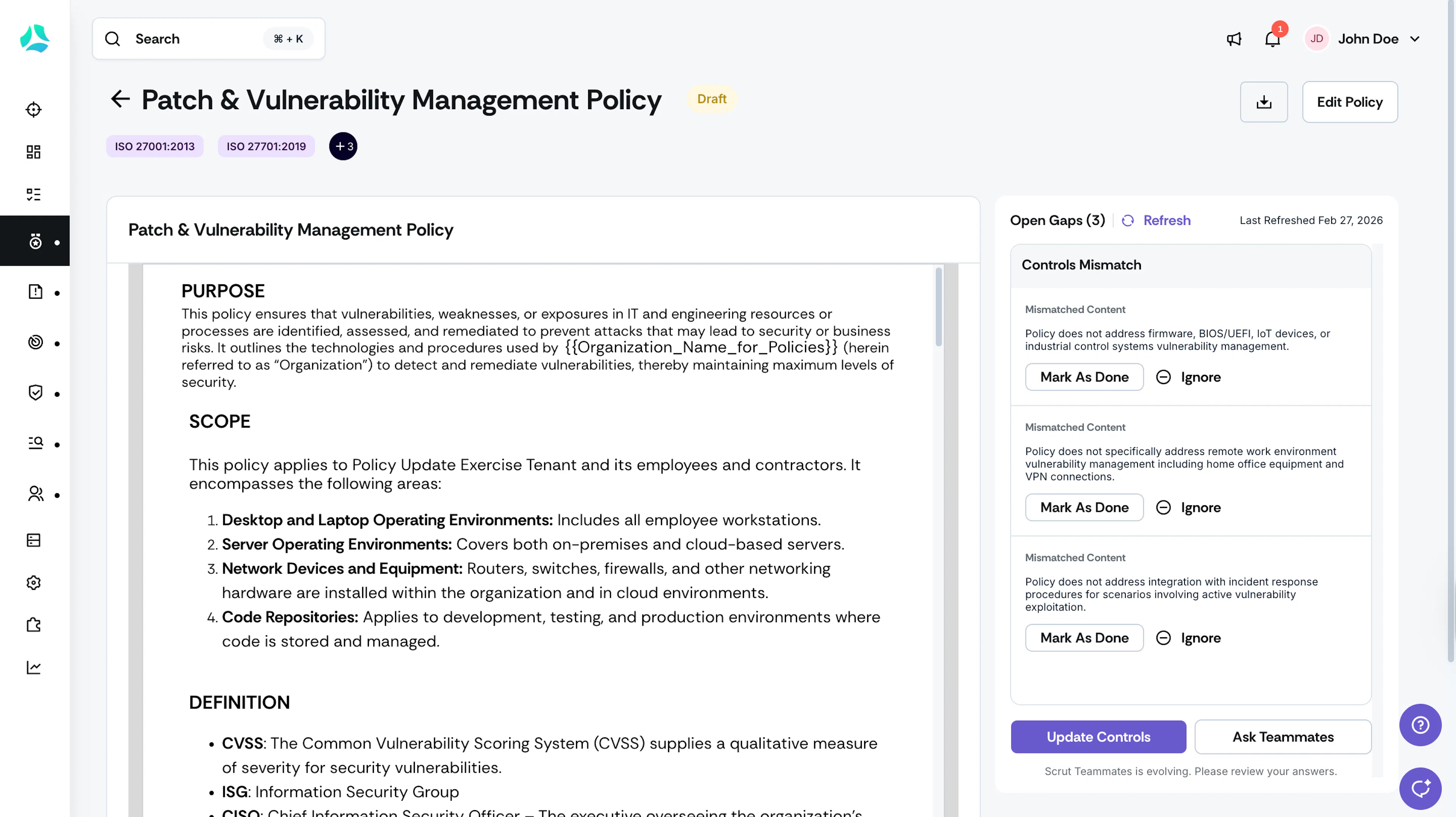
Scrut Teammates analyzes the document and surfaces any gaps in policy content. AI suggestions load automatically.
-
Review each suggestion. For each suggestion, you can:
- Accept: Make the recommended change to the policy content, then click Mark as Done.
- Reject: Dismiss the suggestion if it doesn't apply by clicking Ignore.
-
Click Ask Teammates to initiate a contextual conversation on how to fix the gap.
Pro Tip!
Click Refresh to trigger the AI analysis again.
FAQs
Was this page helpful?