

Understand Your PTaaS Program Calendar
Who can use this feature
- Available as an Add-On for all plans. Contact your CSM to know more.
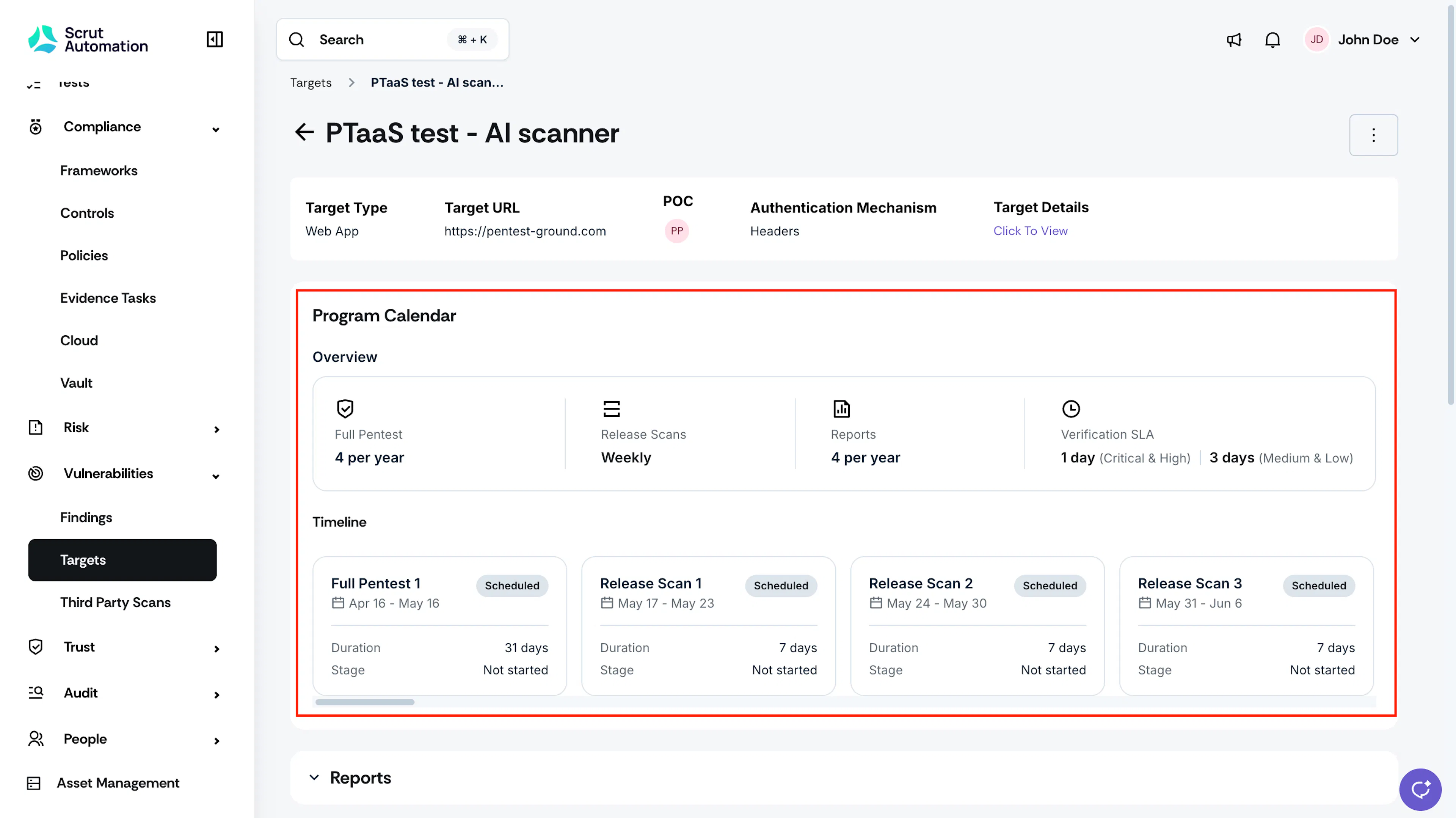
The Program Calendar shows your PTaaS Pro schedule for the entire contract year in one place, so you always know what your program includes, what's coming up next, and where each phase currently stands.
Where is the PTaaS Pro Program Calendar
- Navigate to Vulnerabilities → Targets.
- Click the target you want to review.
- The Program Calendar appears on the Target Detail page.
What’s Included in the PTaaS Pro Calendar
The calendar summarizes what your PTaaS Pro contract includes for this target:
-
Full Pentest: the number of Full Pentests included per year
-
Release Scans: how often Release Scans run, for example, weekly
-
Reports: the number of reports included per year
-
Verification SLA: how quickly Scrut verifies your submitted fixes, broken out by severity. For example, 1 day for Critical and High findings, 3 days for Medium and Low findings.
-
Timeline: The Timeline lays out every phase in your program for the year, in order, as a row of cards you can scroll through horizontally.
Note: Both Full Pentests and Release Scans appear as separate cards on the timeline, in the order they occur across your contract year.
Pro Tip!
Click on any card in the timeline to view further details on it.