

Understand AI Validation and Verification in PTaaS Lite
Learn how PTaaS Lite's AI agents validate findings as Likely TP or Likely FP and verify your fixes before closing or reopening a finding.
Who can use this feature
Available as an add-on. Contact your CSM to learn more.
PTaaS Lite uses two AI agents to do the review work a Security Expert does in PTaaS Pro:
- The validation agent confirms whether a finding is real
- The verification agent confirms whether your fix worked
Understanding how they work helps you trust the results and know when to act.
Two Agents, One Engine
Both agents run on the same re-exploitation engine. They make a bounded, non-destructive re-attack on the known vulnerability only, and never expand into discovery or test outside your target.
| Agent | When it runs | What it decides |
|---|---|---|
| AI Validation agent | Automatically, after every scan and before findings are published | Whether each finding is Likely TP or Likely FP |
| AI Verification agent | When you click Submit For Verification | Whether the fix held, so the finding is Closed or Reopened |
Every verdict is backed by the rationale and evidence the agent captured, which you can review in the resource drawer.
How AI Validation Works
After a scan completes, the AI Validation agent tries to exploit each suspected vulnerability on each affected resource:
- If the exploit succeeds, the resource is tagged Likely True Positive.
- If the exploit fails, the resource is tagged Likely False Positive.
Findings are published only after validation completes, so you never see an unvalidated finding in your Findings list. All published findings start with Open status, irrespective of their validation tag.
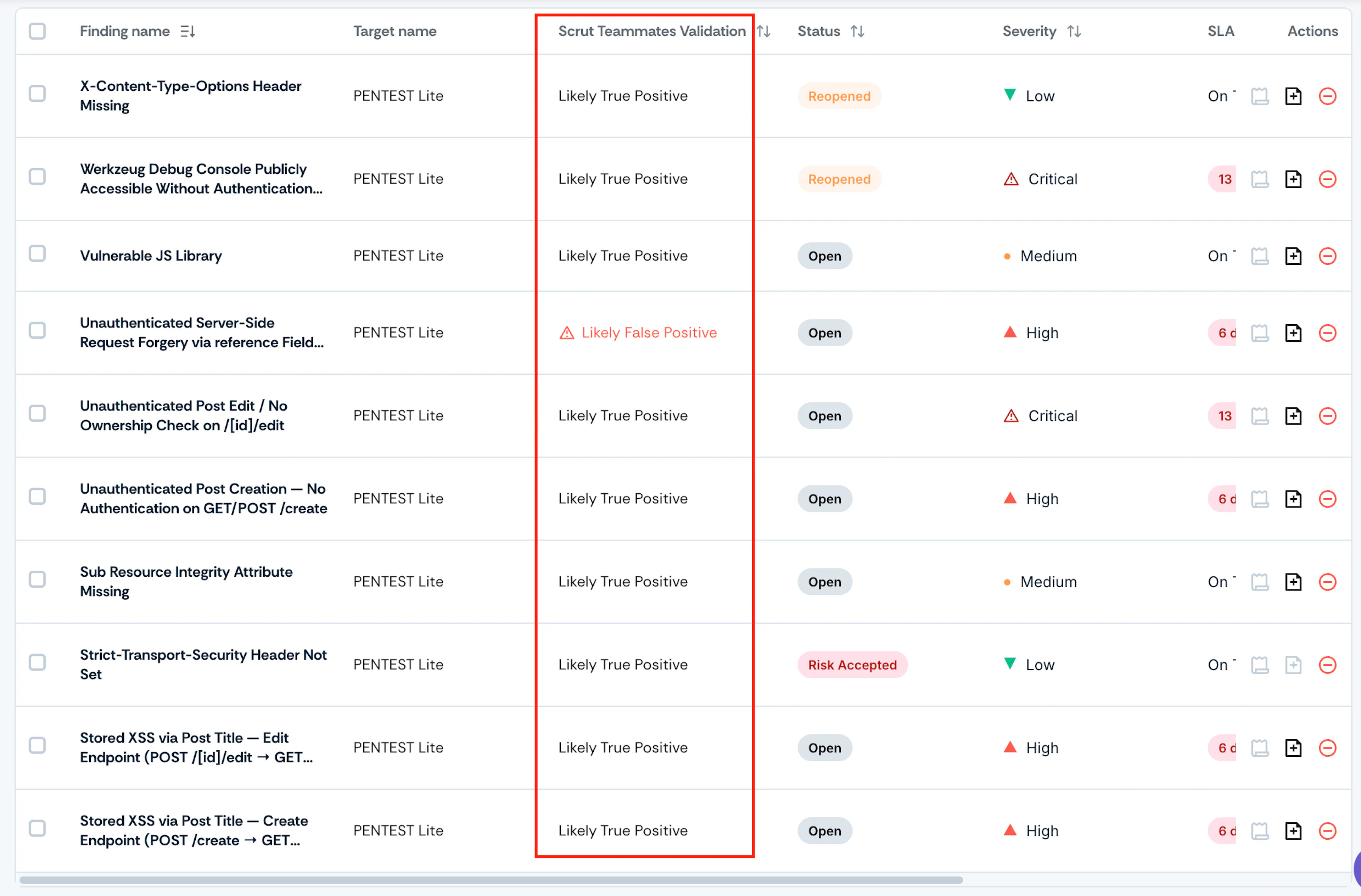
How the Finding-Level Tag Is Decided
A finding can have several affected resources. The finding shows the worst tag across its resources: if even one resource is Likely FP, the finding shows Likely FP. Open the resource drawer to see the tag for each resource.
Heads Up! The validation tag is a label, not an action. A Likely FP finding is never hidden or closed automatically. Review it, ignore it, add a risk, or submit it for verification as you see fit.
How AI Verification Works
When you submit a finding for verification, the finding and its open resources move to Pending Verification. The AI Verification agent replays the original attack against each resource using the role and authentication details saved on your target.
- If the attack fails on a resource, that resource is Closed.
- If the attack still succeeds on a resource, that resource is Reopened.
The finding is Closed only when every resource is Closed. If any resource is Reopened, the finding is Reopened, and the fixed resources keep their Closed status so you can see exactly what's left.
Important: If the agent can't complete verification, for example because your target is unreachable, the finding never closes. Scrut retries automatically, and if the retries fail, the finding returns to its status before you submitted it.
SLA Behavior
The SLA starts when a finding is published after validation. Closing a finding stops the SLA. Reopening a finding doesn't reset it: the SLA continues from the original publish date.
See here for how to define SLAs for findings.
The Resource Drawer
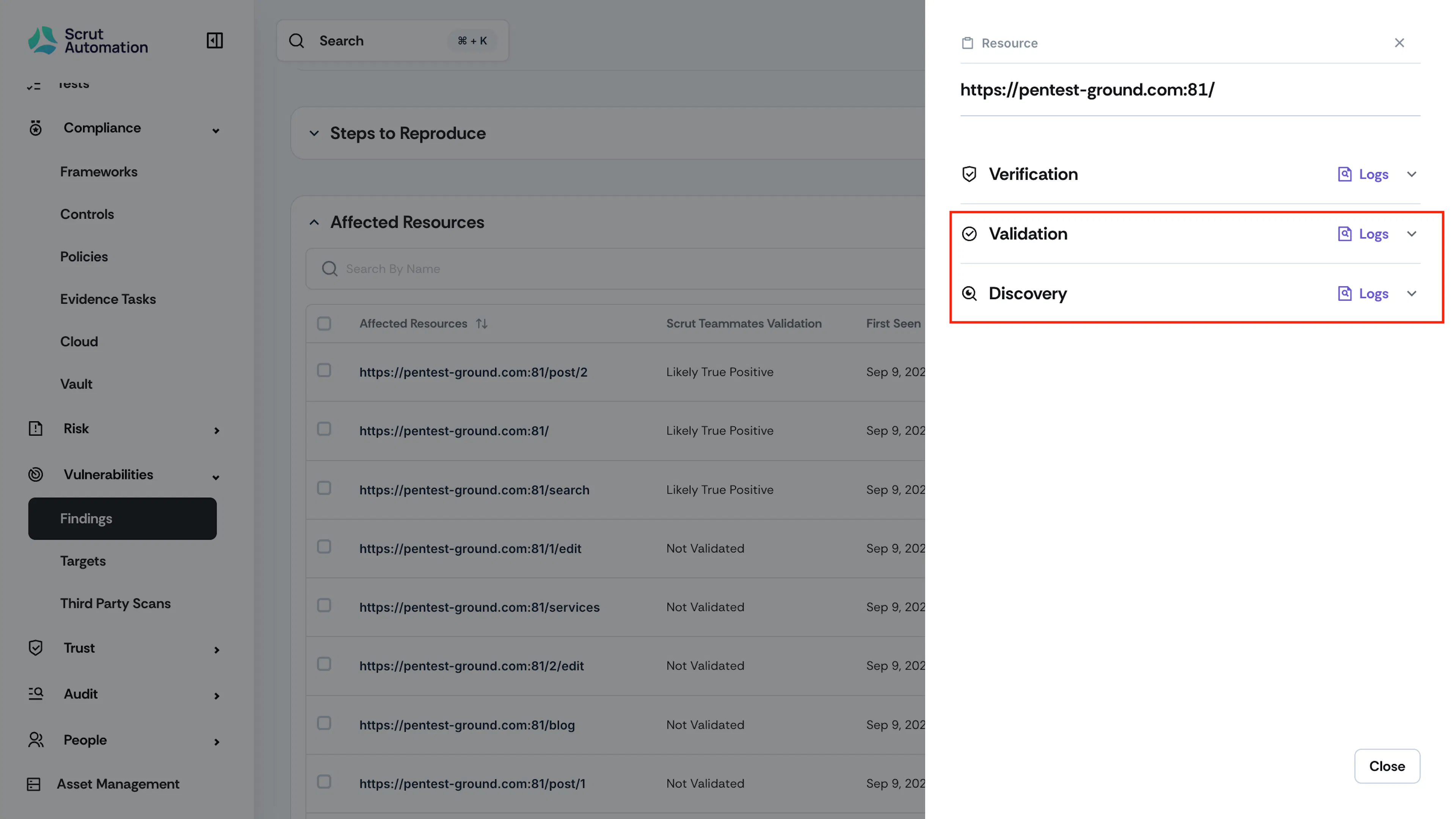
The resource drawer shows the history of each affected resource as a timeline, with the newest event expanded:
- Discovery: What the scan originally found
- Validation: The validation tag and the agent's evidence
- Verification: One entry for each verification run, with its outcome
Each entry includes the outcome, a short rationale, Trace Details (prerequisites, notes, request method, request path, and evidence), the agent's logs, and screenshots where available. Earlier entries are never overwritten, so if a resource fails verification twice for different reasons, you can compare both.
Disagree with a Verdict?
- If a finding was closed but you believe it's still vulnerable, reopen it from the finding detail page and share why.
- If a finding was reopened but you believe it's fixed, submit it for verification again. If it stays reopened, you can ignore it with a justification, or contact your CSM.
Your feedback on AI verdicts helps improve the agents over time.
FAQs
Contact support@scrut.io or your CSM for further assistance.