

How to Set a Reviewer for an App
Who can use this feature
- Supported on Foundation, Growth, and Scale plans
The Reviewer for an application is the Scrut user responsible for reviewing and overseeing that app. Assigning a Reviewer in the Managed tab pre-fills that person as the reviewer when a new access review is created for the application.
How to Assign a Reviewer
1: When Moving an App to Managed
You can set a Reviewer as part of the workflow when moving an application from Discovered or Restricted to Managed.
See How to Manage Discovered Applications for the full steps.
2: Assign or Update a Reviewer in the Managed Tab
-
Navigate to Access Review → Applications → Managed.
-
Click the application name to open its detailed view.
-
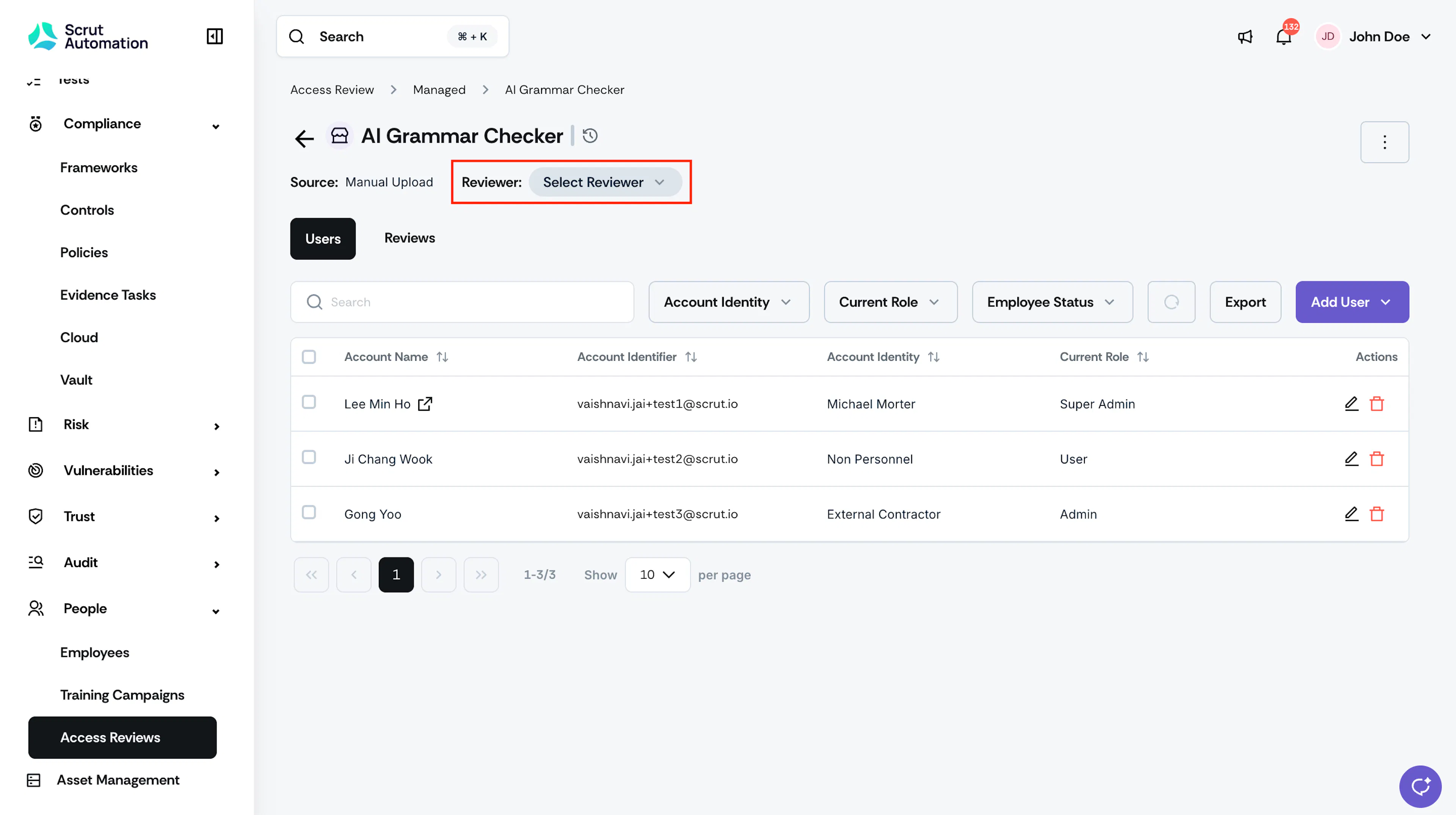
Click the Reviewer field in the header. A dropdown appears listing all Scrut contributors by name and email.
-
Select the user you want to assign.
The selected user will be pre-filled as the reviewer the next time an access review is created for this application.
Note: Changing the Reviewer does not affect any access review already in progress. The change applies to future reviews only.
3: Automatically via Access Review completion
When an access review for a Discovered or Restricted SaaS app is completed, the app moves to Managed, and the reviewer assigned in the review is automatically saved as the app Reviewer.
Reach out to support@scrut.io or contact your CSM for further assistance.