

Integrate Monday.com
Connecting your Monday.com account to Scrut lets you create and link project management tickets, sync ticket attachments to your evidence tasks, and automatically recreate tickets when a linked task's status turns non-compliant. In this article, we explain how to connect your Monday.com account with Scrut to sync compliance evidence.
What This Integration Does in Scrut
- Task Management: Enables you to create project management tickets in Scrut and sync them to Monday.com.
- Bidirectional status sync: Status changes made to a linked item in Monday.com are automatically reflected in Scrut.
- Ticket automation: When a linked compliance item moves to a non-compliant status, Scrut automatically creates a new Monday item to keep your team notified.
- Fetches attachments for evidence tasks: Scrut automatically pulls attachments on items linked to evidence tasks from Monday.
- Scrut Monitor: Collects evidence through Scrut Monitor. This helps automate evidence gathering and significantly speeds up compliance workflows.
Prerequisites
Before starting the integration, make sure you have the following:
- An active Monday.com account with admin access
Permissions and Access Requirements
For Monday.com
- Admin permissions to generate the API v2 Token
- Access to the boards and items you want to link or sync attachments from
For Scrut
- Admin access to Scrut, or Contributor access with permissions to the Integrations module
Integration Setup
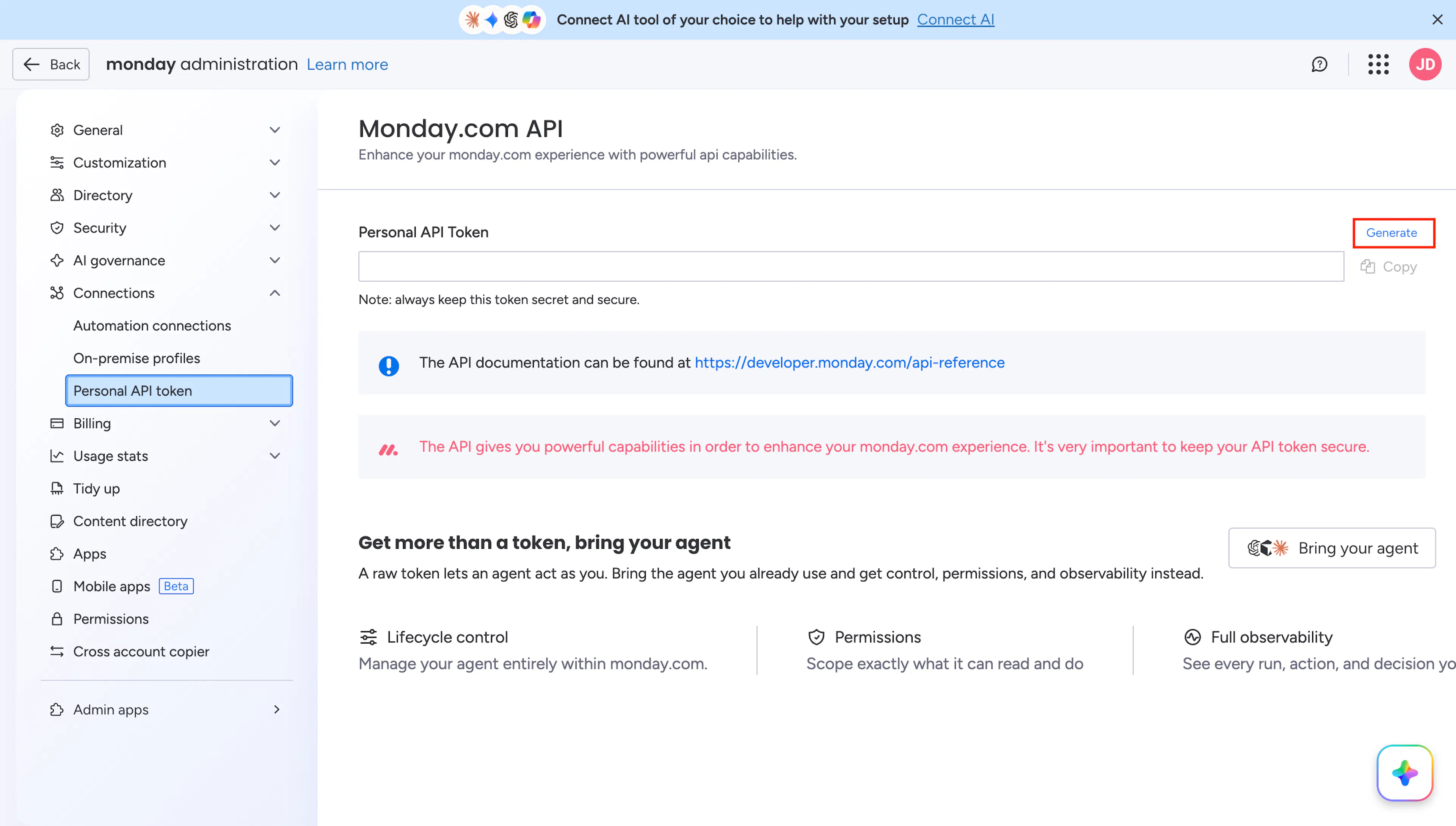
Step 1: Generate an API v2 Token in Monday.com
- Log in to your Monday.com account.
- Click your avatar in the top right corner of the screen.
- Select Administration from the menu. This requires admin permissions.
- Go to Connections → Personal API Token.
- Generate an API v2 Token.
- Copy the token. You will need it in the next step.
Step 2: Connect Monday.com in Scrut
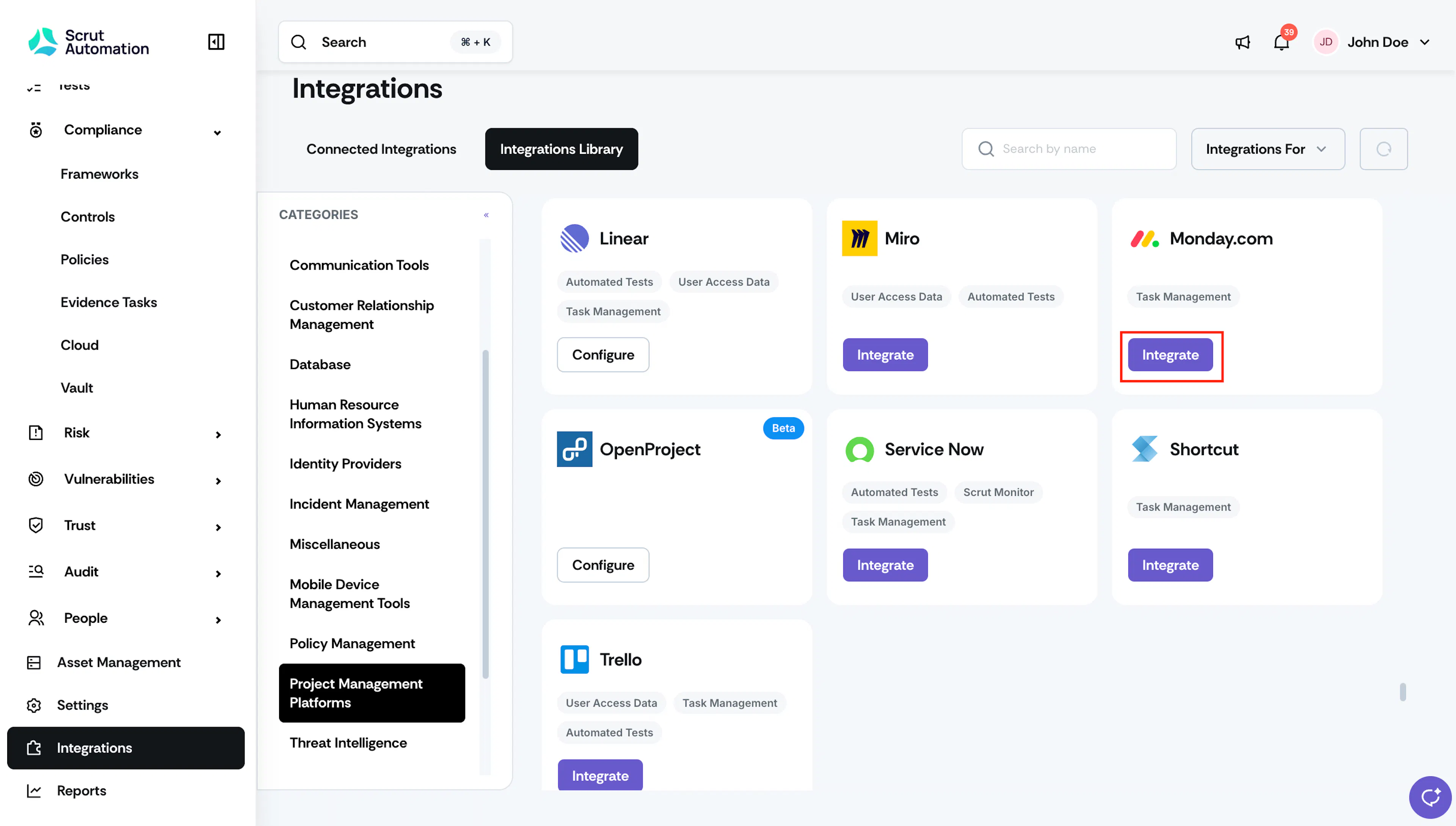
- Sign in to Scrut and click Integrations in the left navigation panel.
- Go to the Integrations Library tab, scroll to the Project Management Platform section and find Monday.com.
- Click Integrate.
- On the Monday.com integration page, click the Details tab.
- In the API V2 Token field, paste the token you copied from Monday.com.
- Click Submit.
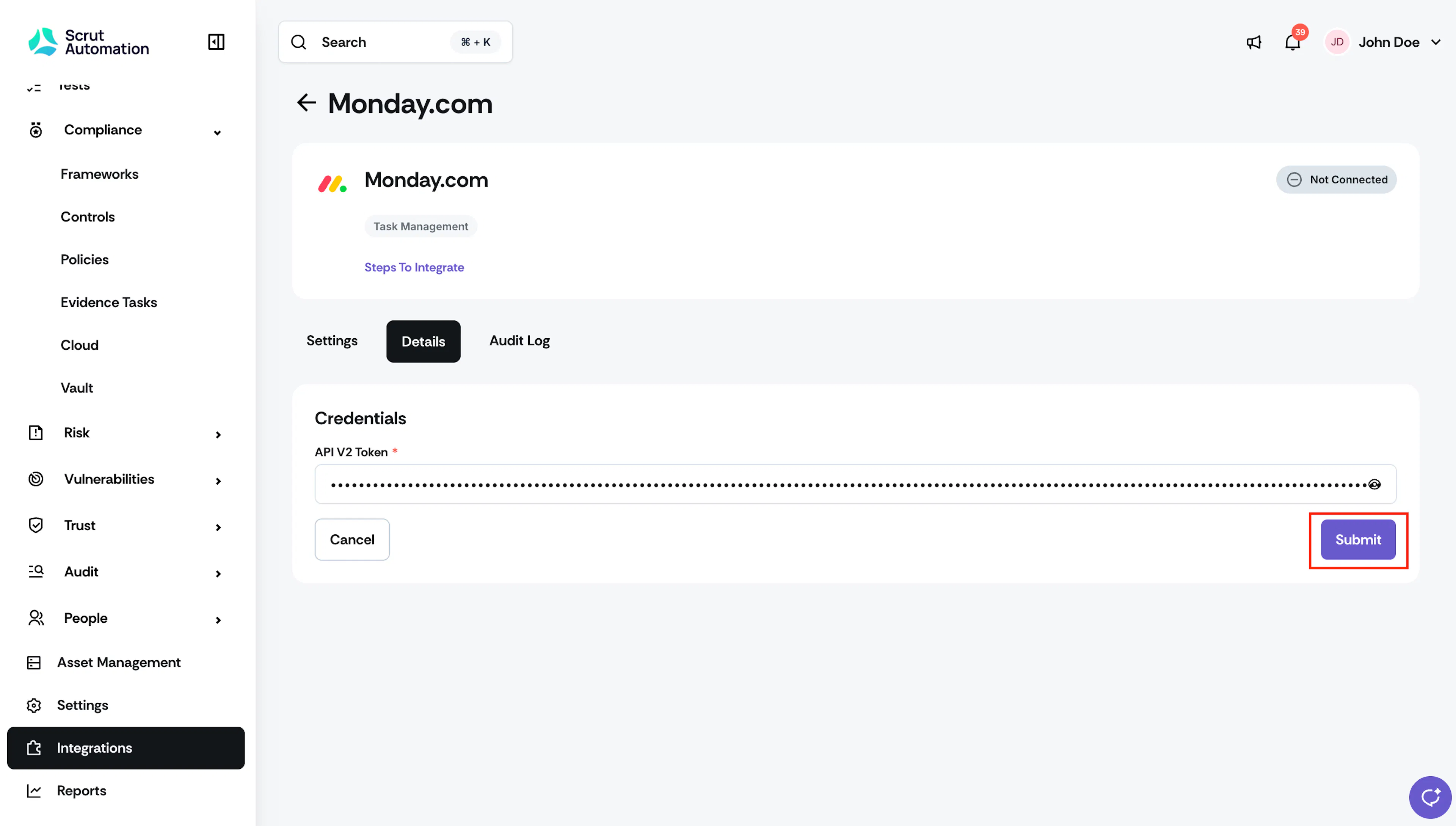
Once the connection is successful, the status indicator changes from Not Connected to Connected.
Step 3: Enable Attachment Sync (Optional)
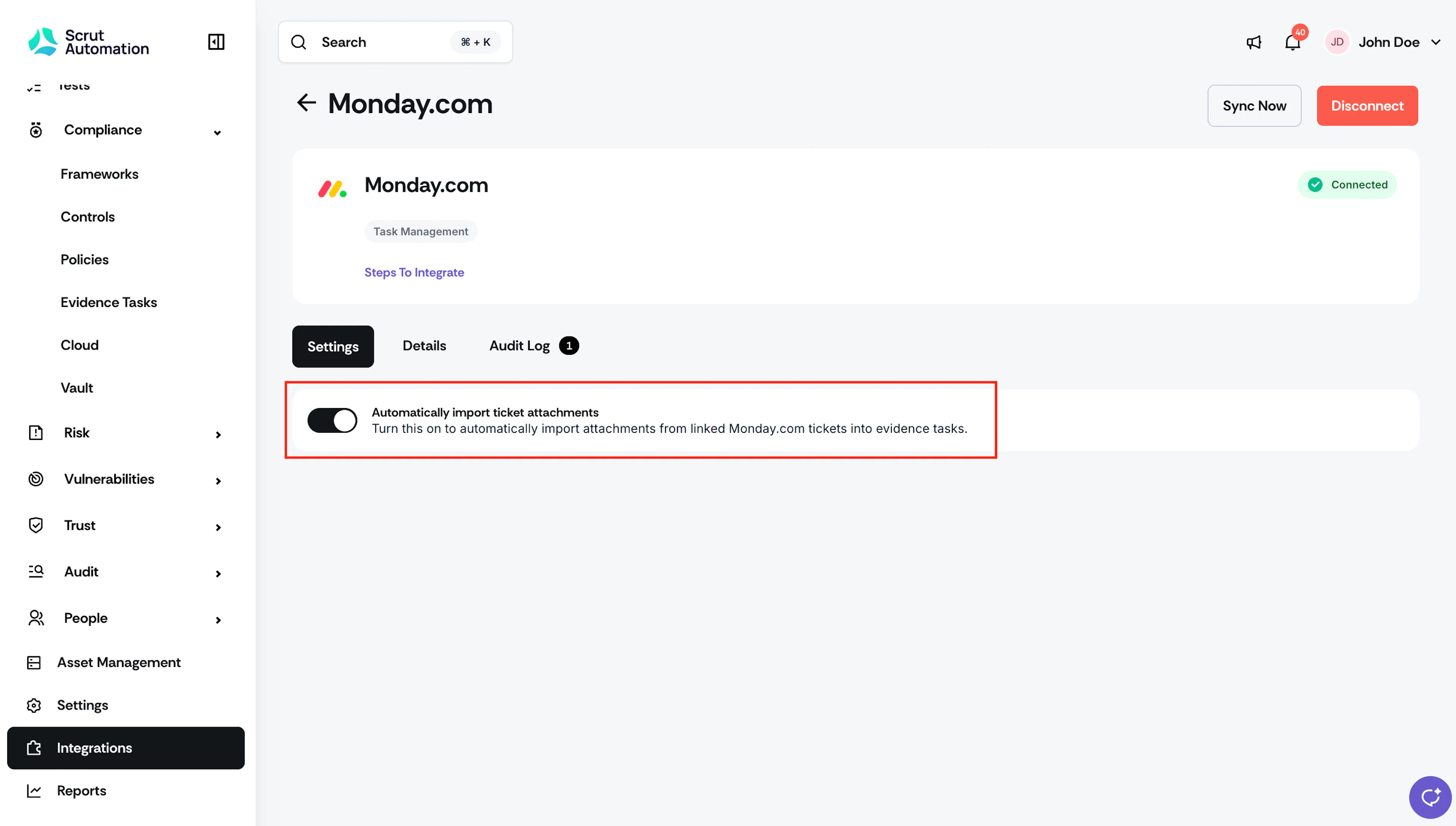
- On the Monday.com integration page, click the Settings tab.
- Turn on the Automatically import ticket attachments toggle. When enabled, this feature automatically fetches attachments from Monday items to the corresponding linked evidence tasks.
Note: Enabling this toggle creates a webhook in your Monday.com account.
What Happens Next?
Initial Data Sync
After you authorize the integration, Scrut automatically begins syncing data from your Monday.com account. You can monitor sync activity and review connection events in the Audit Log tab on the Monday.com integration page. To manually trigger a sync, go to the Monday.com integration settings and click Sync Now.
Create a Monday Item from Scrut
Once connected, you can create a new Monday item directly from any of the following Scrut artifacts: Policies, Evidence Tasks, Tests, Cloud, Risk Management, and Audit Center (Requests, Findings, and Corrective Actions).
-
Open the artifact for which you want to create a Monday item.
-
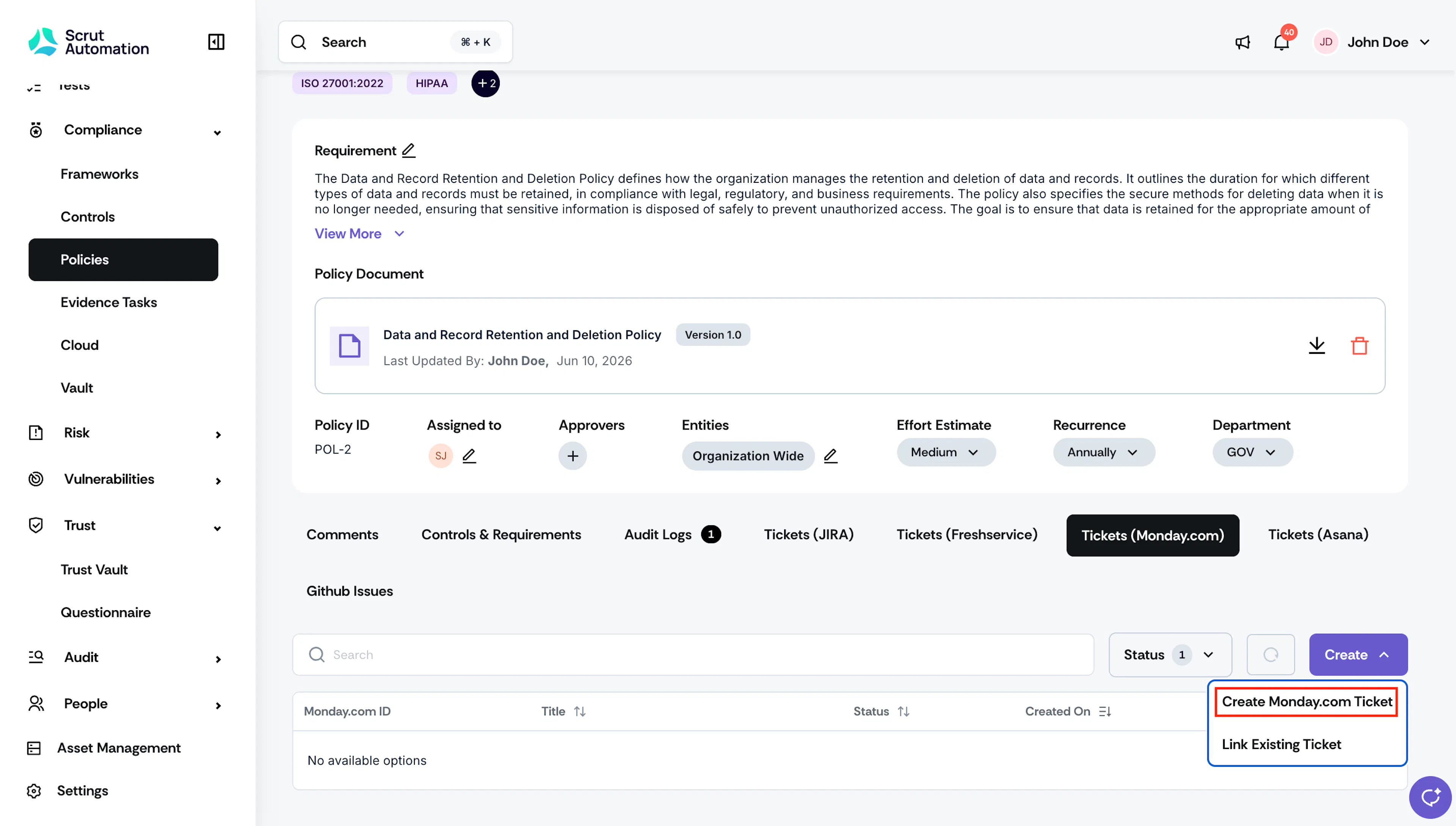
Scroll to the Tickets (Monday.com) tab and click Create → Create Monday.com Ticket.
-
Enter the ticket details.
-
Turn on the Enable Ticket Automation checkbox if you want Scrut to automatically create new tickets if the artifact moves to a non-compliant status.
For example, if the linked policy’s status changes from compliant (Uploaded) to non-compliant, Scrut automatically creates a duplicate of the linked Monday item in the same workspace, board, and group, keeping the original item name and parameters.
-
Complete the Create Ticket tab and submit it.
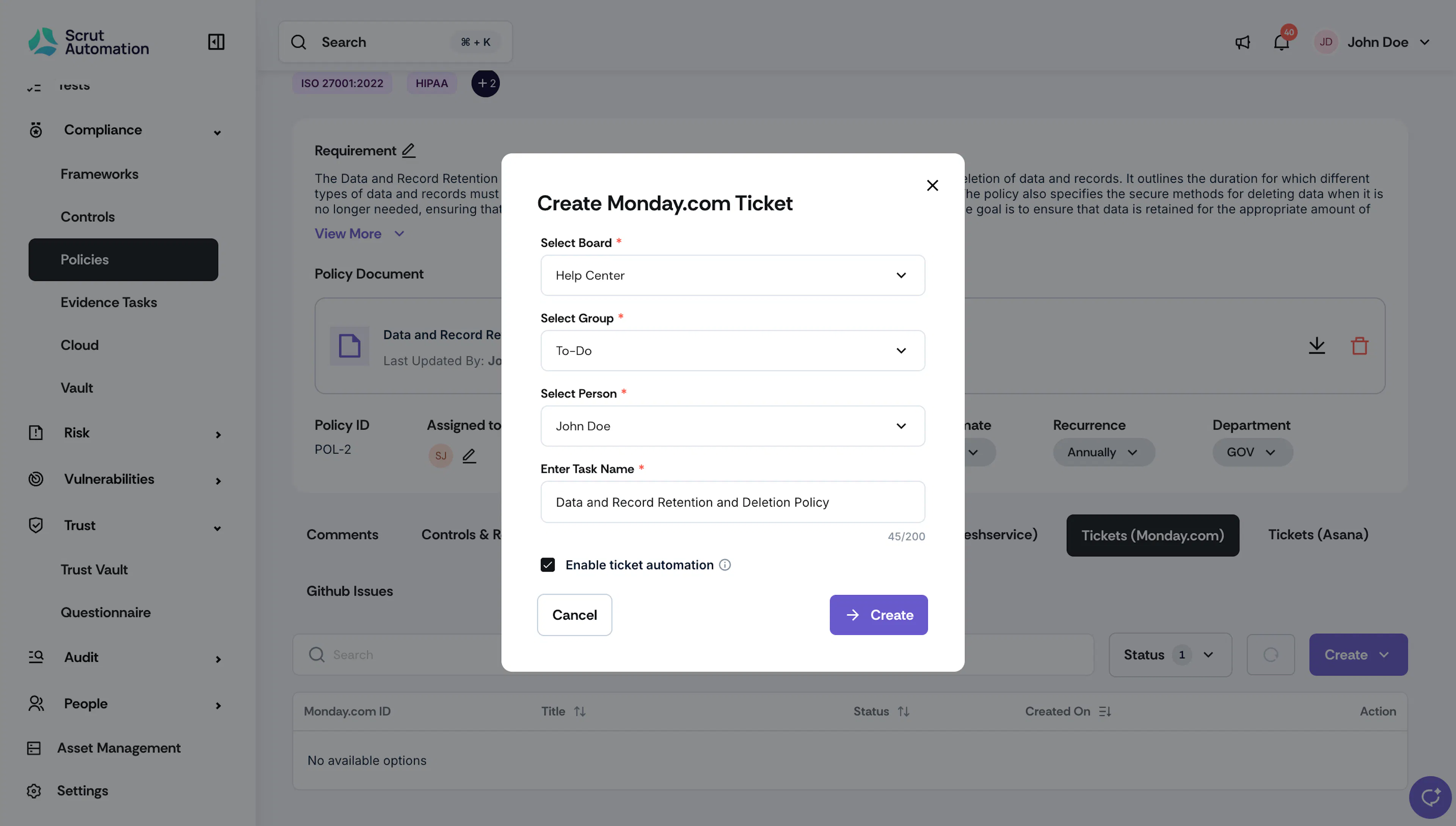
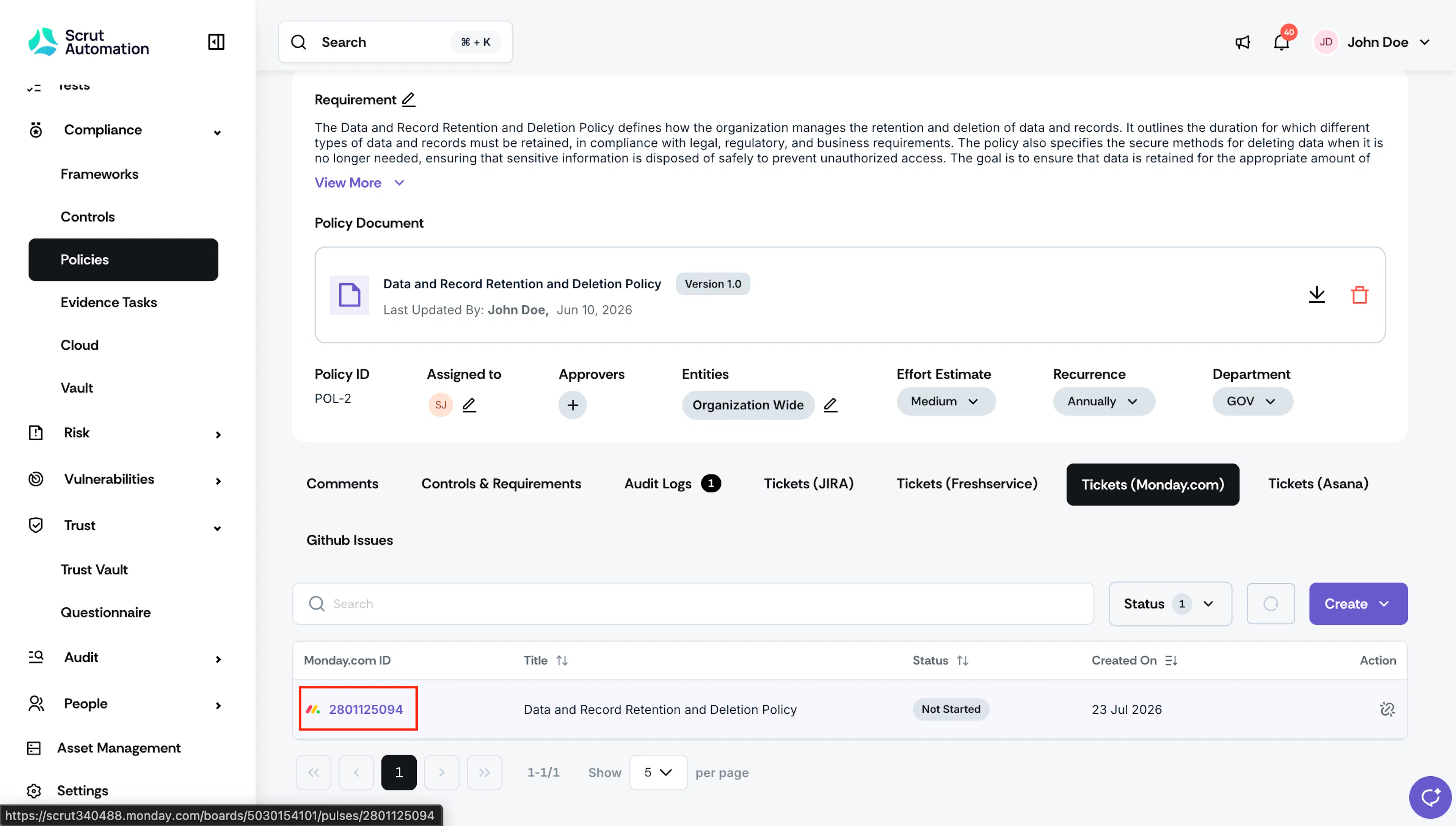
Scrut creates the item in Monday.com and links it to the Scrut task.
Pro Tip!
Clicking the Monday item ID takes you directly to the corresponding item in Monday.
Link an Existing Monday Item to a Scrut Task
- Open the artifact for which you want to create a Monday item.
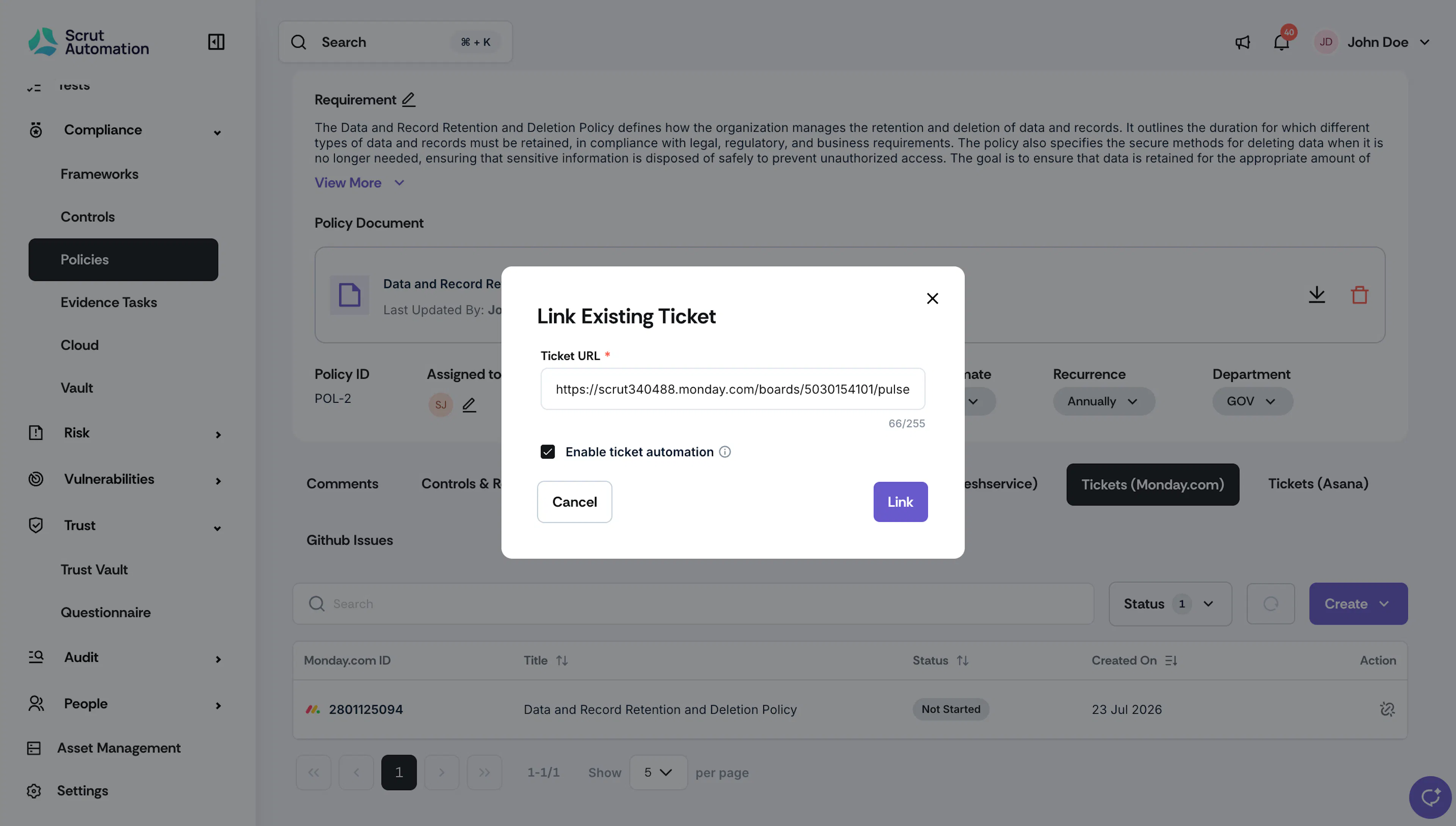
- Scroll to the Tickets (Monday.com) tab and click Create → Link Existing Ticket.
- Paste the full item URL and click Link.
- Scrut validates that the item exists in Monday.com and maps it to the corresponding Scrut artifact.
Create a Scrut Monitor for Monday.com
A Scrut Monitor automatically fetches evidence from a Monday.com board and attaches it to an evidence task at a cadence you choose.
- Navigate to Compliance → Evidence Tasks and open the evidence task you want to automate.
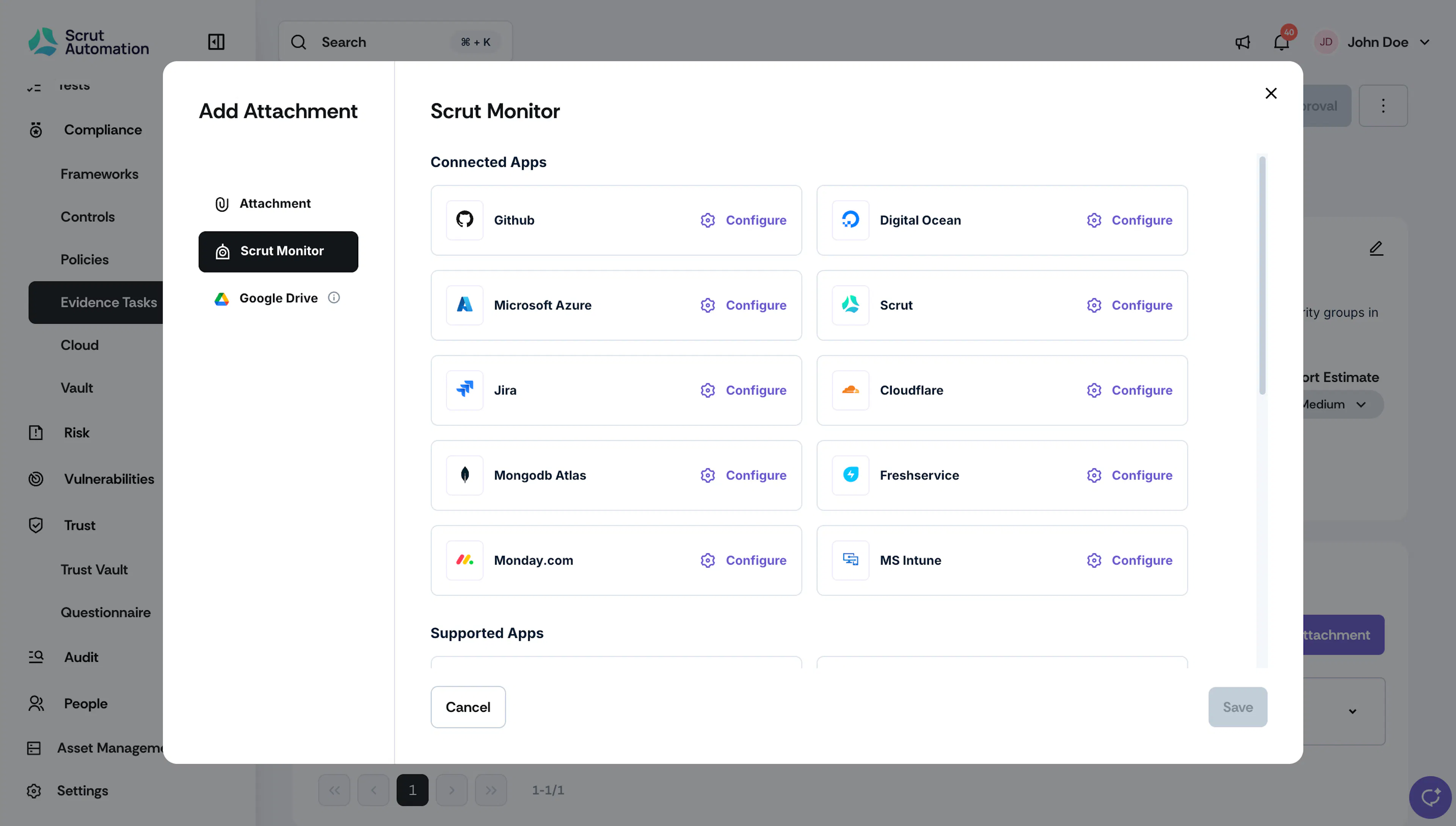
- Click Add Attachment.
- Select the Scrut Monitor tab.
- Under Connected Apps, find Monday.com and click Configure.
- In the Configure Workflow window, fill in the required details.
- In the Cadence, select how often Scrut should re-fetch evidence, for example, Weekly.
- Select the Auto publish evidence task checkbox to have Scrut automatically publish the evidence task each time new evidence is attached on the set cadence. Uncheck it if you want the task to move to Draft instead when new evidence is attached, so you can review it before publishing.
- Click Save.
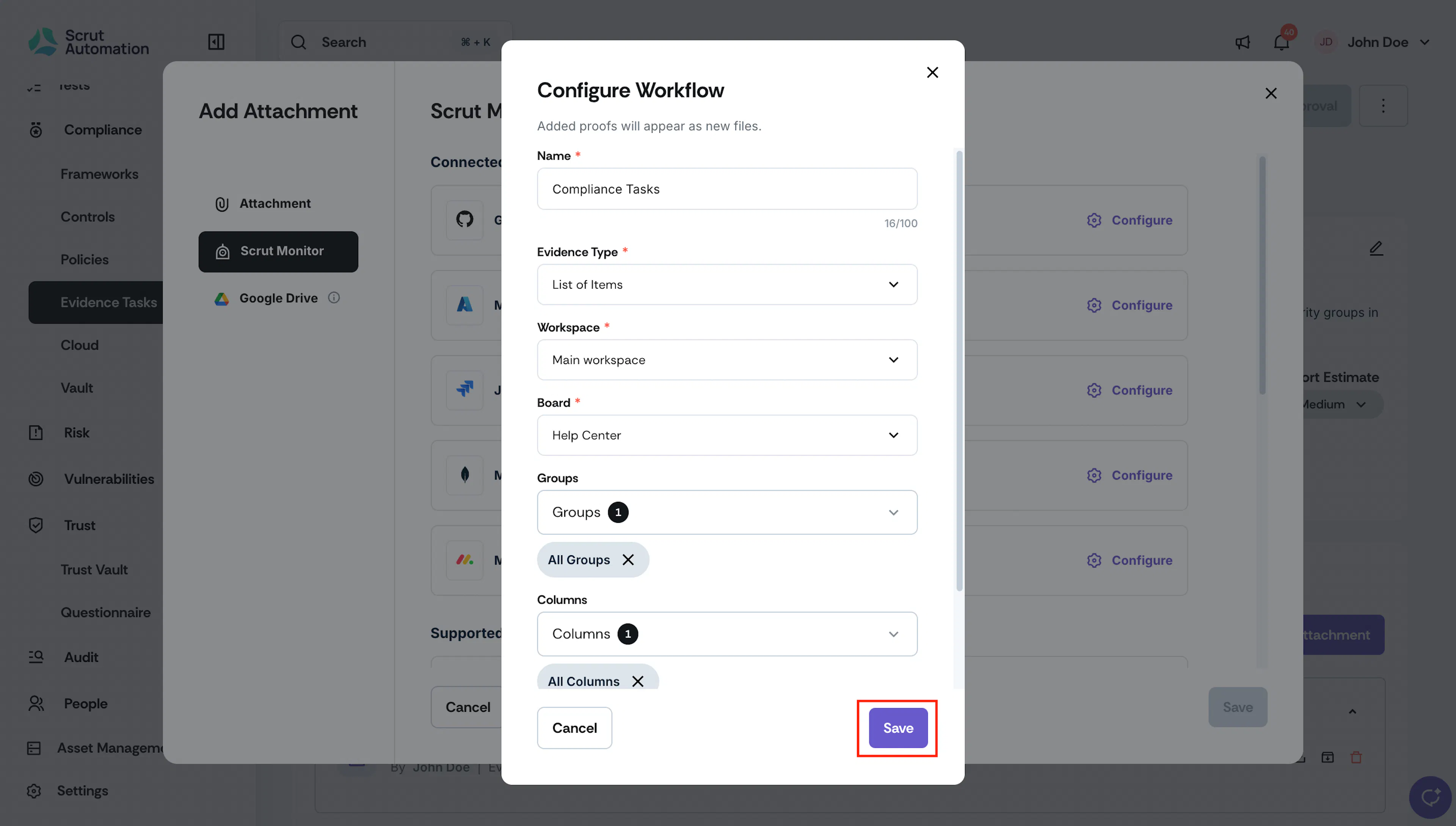
Evidence fetched by the monitor appears as new files on the evidence task each time it runs.
Common Errors and Troubleshooting
Invalid API Token
Cause: The API v2 Token entered is incorrect, expired, or was generated without admin permissions. Possible solutions:
- Regenerate a new API v2 Token in Monday.com using admin credentials
- Re-enter the token on the Details tab and click Submit
Monday Item not found when linking
Cause: The item ID or URL entered does not match an existing Monday item, or your account does not have access to it. Possible solutions:
- Confirm the item ID or URL is correct
- Confirm your Monday.com account has access to the board containing the item
Attachments not syncing
Possible solutions:
- Confirm the Automatically import ticket attachments toggle is turned on in the Settings tab
- Reconnect the integration if your Monday.com API token has changed
FAQs
Reach out to support@scrut.io or contact your CSM for further assistance.