

February 2026
In this release
- ISO/IEC 27701:2025 joins the Frameworks module as a stand-alone privacy management standard for PII controllers and processors.
- Scrut Teammates suggests control mappings for uploaded policies and flags policy and evidence gaps automatically, with reviewers taking the final call.
- Policies import from PDF, DOCX, and other formats directly into the inline editor, and policy revision history is also now editable.
- Trust Portal viewers can subscribe to updates.
- Scrut now auto-collects known vendors' trust documents during onboarding.
- My Tasks in the Task Center pulls together work across Policies, Evidence, Vulnerabilities, Vendors, and audit requests.
Key Features & Enhancements
Support for ISO/IEC 27701:2025 Privacy Framework
Privacy programs that grew up beside an Information Security Management System (ISMS) now face a clearer, independent path: The ISO/IEC 27701:2025 is a stand-alone Privacy Information Management System (PIMS) standard, published in October 2025, for personally identifiable information (PII) controllers and processors.
Scrut now includes ISO/IEC 27701:2025 in the Frameworks module so privacy obligations can sit alongside your other frameworks. Customers can link privacy requirements to policies, risk work, and technical documentation, use evidence and policy suggestions for PIMS-oriented validation, and generate readiness reports for internal and external stakeholders.
Learn more: Supported Frameworks
Automatically map uploaded policies to compliance controls
Uploading a policy is only the start of the work. Teams still have to decide which controls it covers, whether the content is strong enough for the current audit period, and whether evidence uploaded later actually closes the requirement.
Scrut solves this with AI-powered, policy-control mapping. After you upload a policy, Scrut Teammates analyzes the document and suggests which standard controls and custom controls the policy satisfies. Reviewers can accept, reject, or adjust each suggestion before saving, so automation accelerates mapping without removing human sign-off.
Learn more: Map Controls to Policies using Scrut Teammates
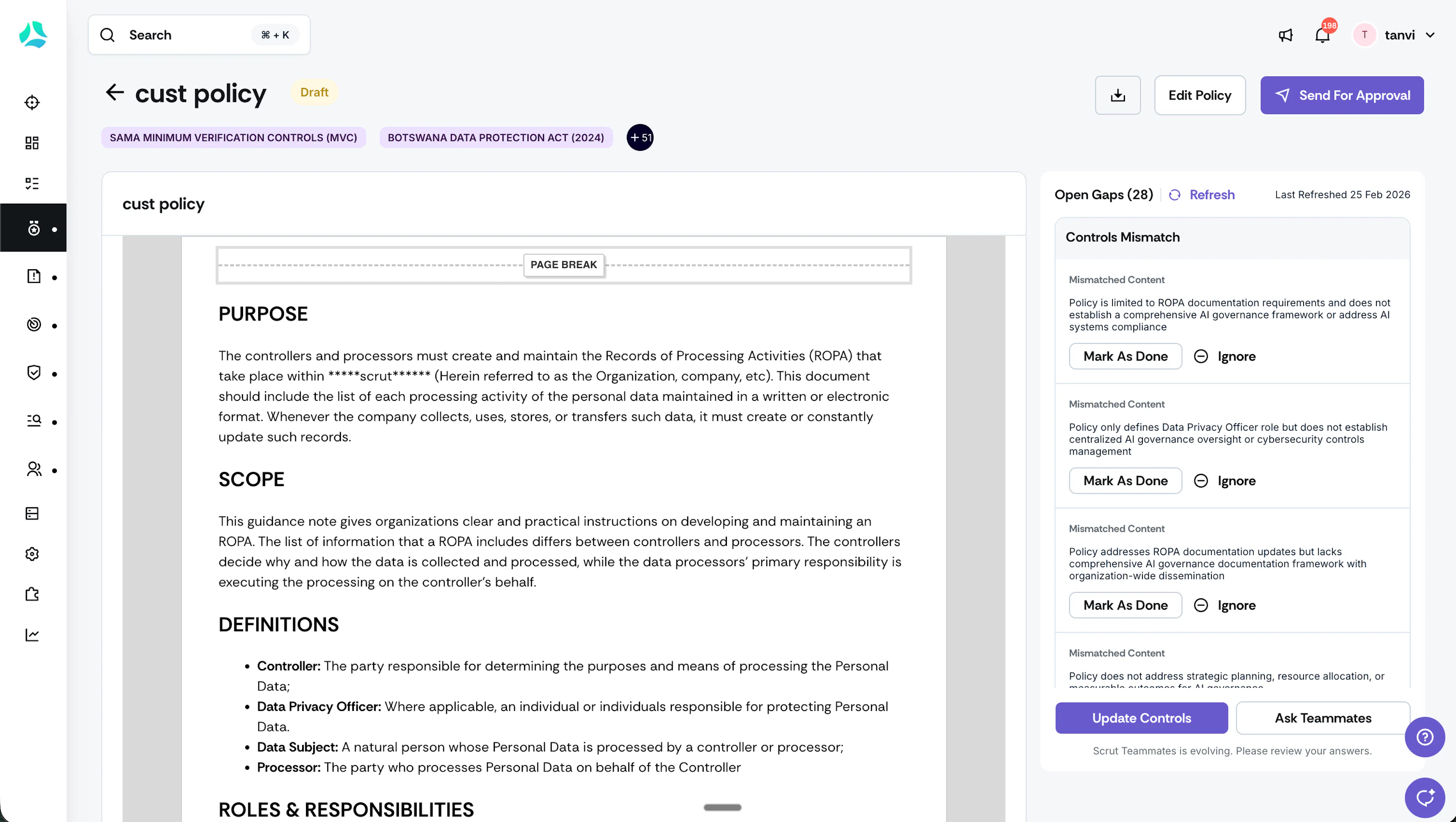
Detect policy gaps before an auditor finds them
Policy libraries often answer only one question: does a document exist? They rarely tell owners whether the policy is aligned to mapped controls, outdated for the current audit period, or missing content an auditor will expect.
Scrut Teammates leverages AI to evaluate policy alignment and surface gaps, with guidance on what to update next. The experience is context-aware to the current audit period and your frameworks, so you can proactively fix the gaps before an auditor flags them.
Learn more: AI-Detected Policy Gaps
Seamlessly import existing policies into Scrut
Bringing legacy policies into a GRC tool often forces a choice: store a static attachment you cannot edit, or rebuild the policy from a blank page.
Scrut now makes it easy to import existing policies in PDF, DOCX, and other formats. You can start from a template, draft from scratch, import a file directly into the inline editor, or add a file as an attachment. We recommend importing into the editor when the policy must remain editable later; attachments remain non-editable.
Learn more: Upload a Policy Document
Keep policy revision history accurate
Policy owners still maintain revision history as a table inside the document body. Every publish cycle risks stale rows, duplicate tables in exports, and version details that drift from what reviewers see in preview. You can now add or edit policy versions directly in the inline editor and remove duplicate or unnecessary version entries.
Learn more: Manage Policy Versions
Spot gaps as soon as you upload evidence
Evidence gaps usually show up late: during internal dry runs, or worse, after an auditor opens a request. Scrut Teammates now runs evidence gap analysis automatically when evidence is uploaded or updated for the current audit period. After the analysis, Teammates calls out missing requirements, partial coverage, inconsistencies, and also suggests actionable next steps.
Learn more: Detect Evidence Gaps with Scrut Teammates
Notify subscribers instantly when you publish a new Trust Portal update
Trust centers change whenever certifications renew, documents replace older versions, or security updates go live. Customers and prospects who care about those changes usually have no choice but to remember to revisit the portal after every certification, document refresh, or security update.
Trust Portal subscriptions let viewers opt in so they get email notifications as soon as you publish an update. Enable the feature in Trust Vault → Settings → Additional Settings. Viewers can subscribe to updates by signing up on the portal and receive email notifications for new updates.
Learn more: Enable Trust Portal Subscriptions
Auto-collect vendor documents during onboarding
Vendor onboarding often stalls, as supporting trust documents are still missing. Teams lose time searching for the vendor’s public trust centers, downloading security documents from several places, and re-uploading them into the assessment workspace.
Scrut solves this by auto-collecting Trust Portal documents of known vendors. As you type the vendor name and URL, Scrut automatically links the compliance URL on the vendor Documents tab. Furthermore, if the vendor hosts a public trust portal on Scrut, you can select and add the vendor’s public documents directly from the live Trust Portal.
Learn more: Auto-fetch Vendor Documents
Streamlined approval workflow for risk mitigation tasks
Risk mitigation work often closes through chat threads or informal email sign-off. Without a durable review state, it is hard to prove that treatment actions were implemented, challenged, and accepted.
Scrut now includes a streamlined approval workflow for risk mitigation tasks. When creating a mitigation task, owners choose an approver. The approver defaults to the risk assignee; if there is no risk assignee, the mitigation task creator becomes the approver. Assignees can add an attachment and submit for review. Approvers can approve or request a revision; assignees revise and resubmit. The cycle repeats until the approver closes the task.
Learn more: Mitigation Task Approval Workflow
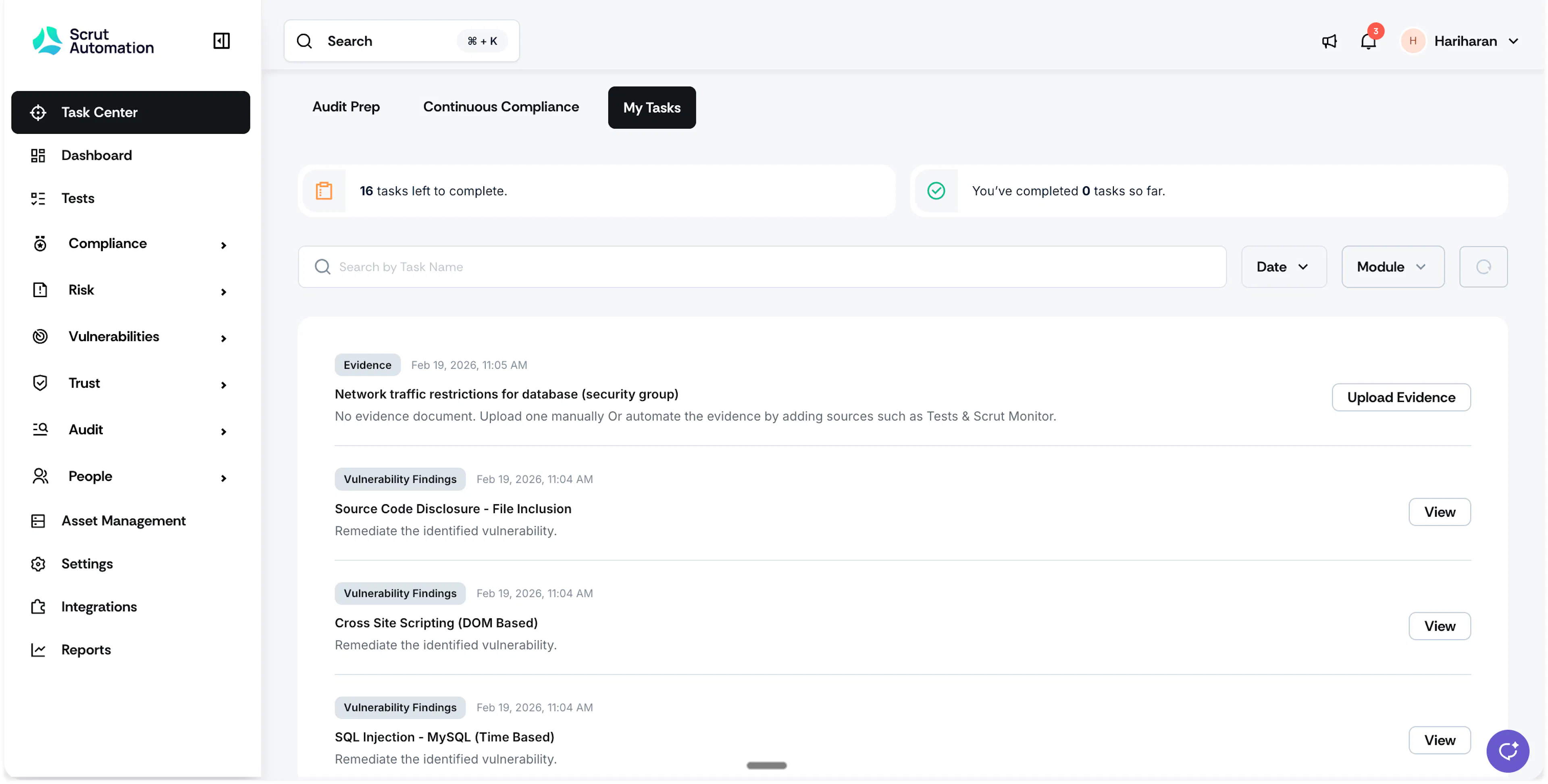
View all your compliance tasks in one single place
Compliance work used to live across Policies, Evidence, Vulnerabilities, Vendors, audit requests, and findings. Contributors opened module after module to learn what was theirs, which delayed uploads and left ownership unclear until someone chased them.
The My Tasks tab in the Task Center consolidates every task assigned to you in one view, with context on the artifact, status, and next action. Filter and search by module, assigned date, or task name, and track pending versus completed counts. Contributors in DevOps, HR, Security, and other owning teams can see what needs attention without hopping modules.
Learn more: My Tasks Tab
Other Updates
- Mandatory vendor questionnaire attachments: Mark attachments mandatory for questions, so vendors cannot submit without uploads such as policies, certifications, or reports.
- Questionnaire smart import field selection: During Questionnaire Import, explicitly map which columns are questions and which are answers (including multi-field selections).
- Import your risk register without adhering to a strict template: Previously, teams had to download the risk import template, reshape their register to match, and upload again. Scrut has simplified the risk register import into three easy steps: upload your file, map column headers to Scrut fields, and preview the mapped data before saving.
- Sections with no data are automatically hidden in your live Trust Portal: Trust Portal sections render only when they contain published data; empty sections stay hidden.
- Integration-synced vendors: Integration-synced vendors can be archived but not deleted, which prevents them from reappearing after sync.
- Editable evidence templates: You can now edit evidence templates directly within Scrut to match your specific organizational requirements.
- Notification Center: View all your pending tasks and other notifications directly in the Notifications Center instead of browsing module-by-module.
- Cloudflare multi-zone: Cloudflare integration now supports multi-zone selection; monitors collect evidence per selected zone, and tests run per zone with failing zones shown as separate resource rows.