

January 2026
In this release
Scrut’s January release adds two new frameworks and introduces explicit approval steps for audits, access reviews, and risk treatment.
- FedRAMP Moderate and ISO/IEC 27018:2025 join the Frameworks module with pre-configured policy templates and automated evidence mapping.
- Corrective actions, access reviews, and residual risk all get a named approver and an audit trail.
- Scrut Teammates now checks every manually updated evidence item for quality, including evidence supplied as a Google Doc link.
- Trust Vault reporting, auditor-ready DAST findings reports, and entity-scoped Questionnaire Autofill have been revamped.
Key Features & Enhancements
Support for FedRAMP Moderate Framework
SaaS and cloud vendors that sell to U.S. federal agencies need a clear way to track the FedRAMP Moderate baseline, which is built on NIST Special Publication (SP) 800-53 controls and continuous monitoring expectations.
Scrut now supports the FedRAMP Moderate baseline in the Frameworks module. Teams can work from Scrut’s pre-configured policy templates and automated evidence mapping against the Moderate control set rather than rebuilding the inventory from scratch.
Learn more: Supported Frameworks
Support for ISO/IEC 27018:2025 Cloud Privacy Framework
Cloud providers that process Personally Identifiable Information (PII) are under pressure to show privacy-specific controls, not only a general information security program. Teams chasing GDPR-aligned cloud privacy proofs often bolt ISO/IEC 27018 work onto spreadsheets outside their primary compliance system.
Scrut now supports ISO/IEC 27018:2025 in the Frameworks module so cloud PII processor controls can be managed with Scrut’s evidence and policy suggestions in the same workspace as related ISO programs.
Learn more: Supported Frameworks
Use AI to validate evidence quality before your auditor reviews it
Most compliance teams discover incomplete or weak evidence only during an audit, not before it. By then, the auditor has already flagged the gap, and the team is racing to replace screenshots, missing fields, or stale artifacts.
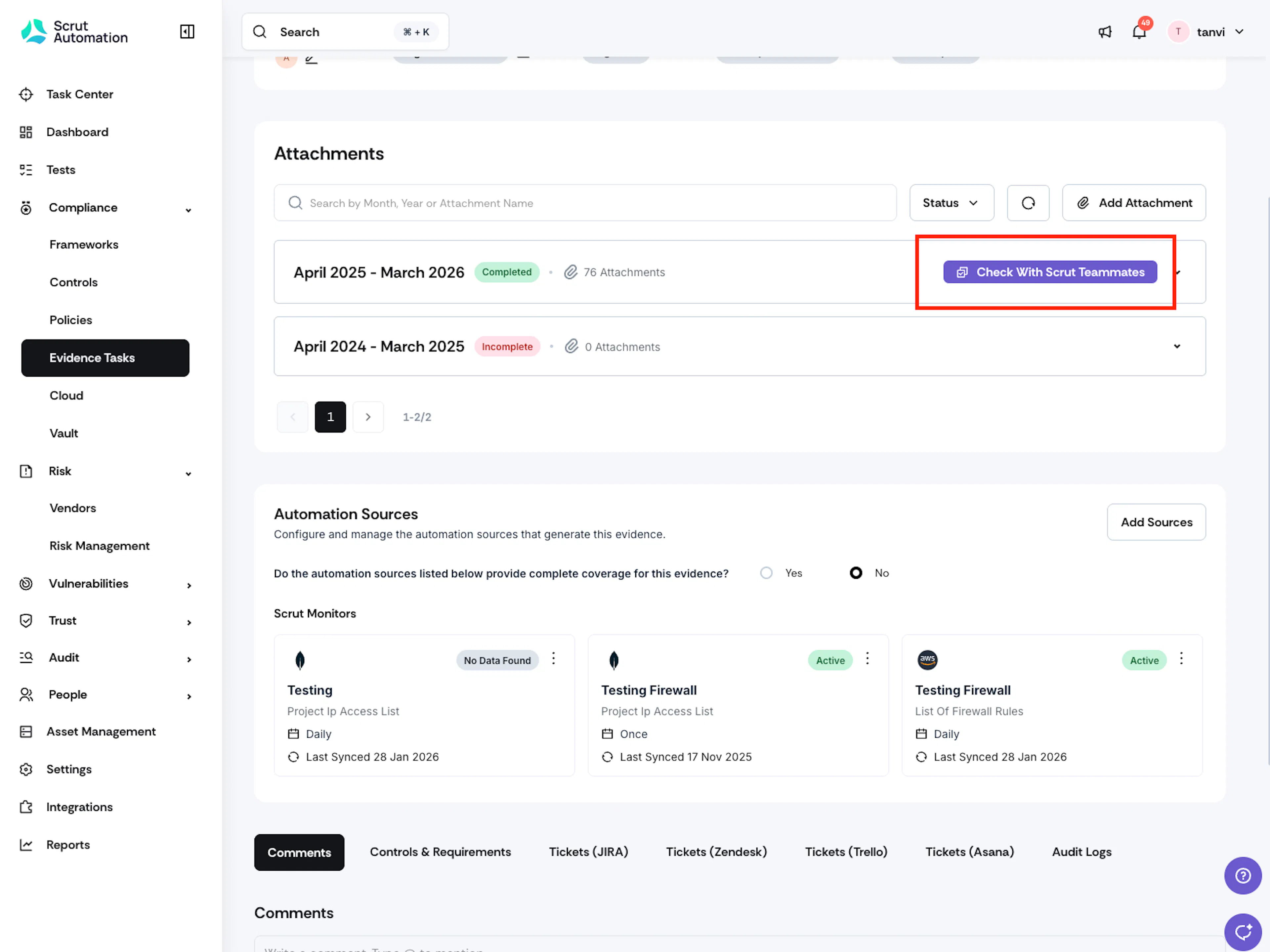
Scrut’s Evidence Checker, powered by Scrut Teammates, now runs on every manually updated evidence item rather than a limited subset of evidence types. Users can click Check with Scrut Teammates to receive an AI-generated quality assessment that highlights strengths, gaps, and missing context, plus concrete improvement suggestions. Scrut Teammates can also read Google Document links when evidence is provided as a link, so validation is not limited to uploaded files.
Learn more: AI Evidence Checker
Track Trust Portal user insights
Security and GRC teams that manage a Trust Portal often lack visibility into which visitors, documents, or access decisions are driving portal activity. The Trust Vault module in Scrut now includes an enhanced dashboard that shows portal views over time, with clickable metrics that dive deep into visitor data, access requests, top-engaged documents, and most active accounts or users.
Learn more: Trust Vault Dashboard
Share AppSec findings as an auditor-ready report
Application security teams can run Dynamic Application Security Testing (DAST) continuously and still struggle when an auditor, customer, or marketplace asks for proof. Raw scanner exports are hard to read externally, and last year’s penetration test PDF no longer matches the live application.
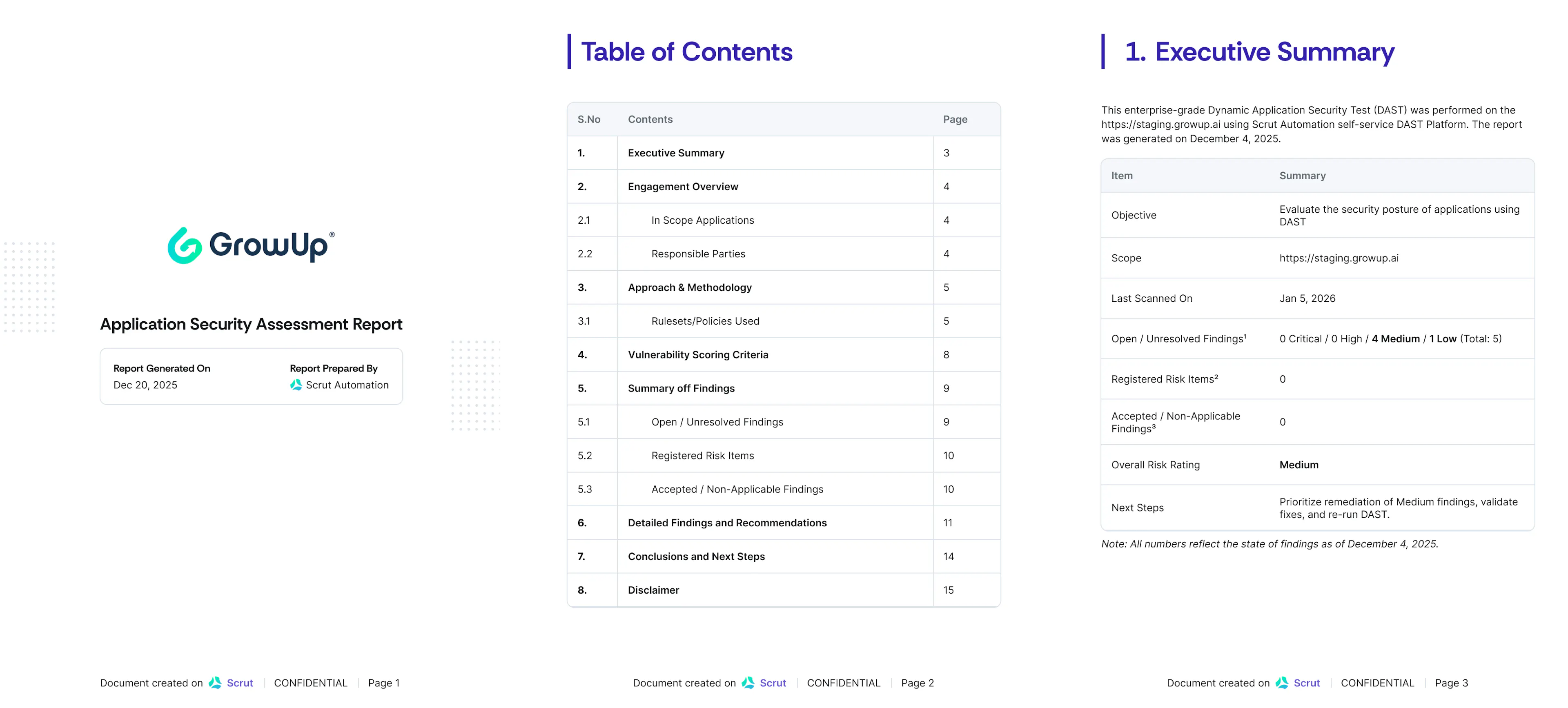
Scrut’s vulnerabilities module lets users generate a professional PDF from the Findings tab for a selected application target. Each report includes an executive summary with an overall risk rating and an engagement overview with scope, approach and methodology. Because the report is generated from live DAST scan data, the shared artifact reflects the current scan rather than a static export assembled offline.
Learn more: Application Security Report
Approve corrective actions directly within the audit
When evidence is uploaded against a corrective action, reviewers frequently approve it over email or in Slack conversations. Auditors and owners lack a single place to see what was accepted, what still needs changes, and who made the call.
Scrut has introduced an approval workflow for corrective actions in the Audit Center.
- When a corrective action is created, an approver is assigned.
- Owners attach evidence and submit for review. The task status moves to Needs Review, and the approver is notified.
- The approver can approve and close the corrective action or request a revision with a written reason.
- After revision, the owner resubmits, and the approver can approve and close once satisfied.
Learn more: Corrective Action Workflow
Add approvers in Access Reviews
Access reviews often end when a reviewer finishes checking entitlements, even though a separate approver is accountable for sign-off. Without an explicit handoff, it is hard to prove who approved what, and declined work has no clean path back to the reviewer.
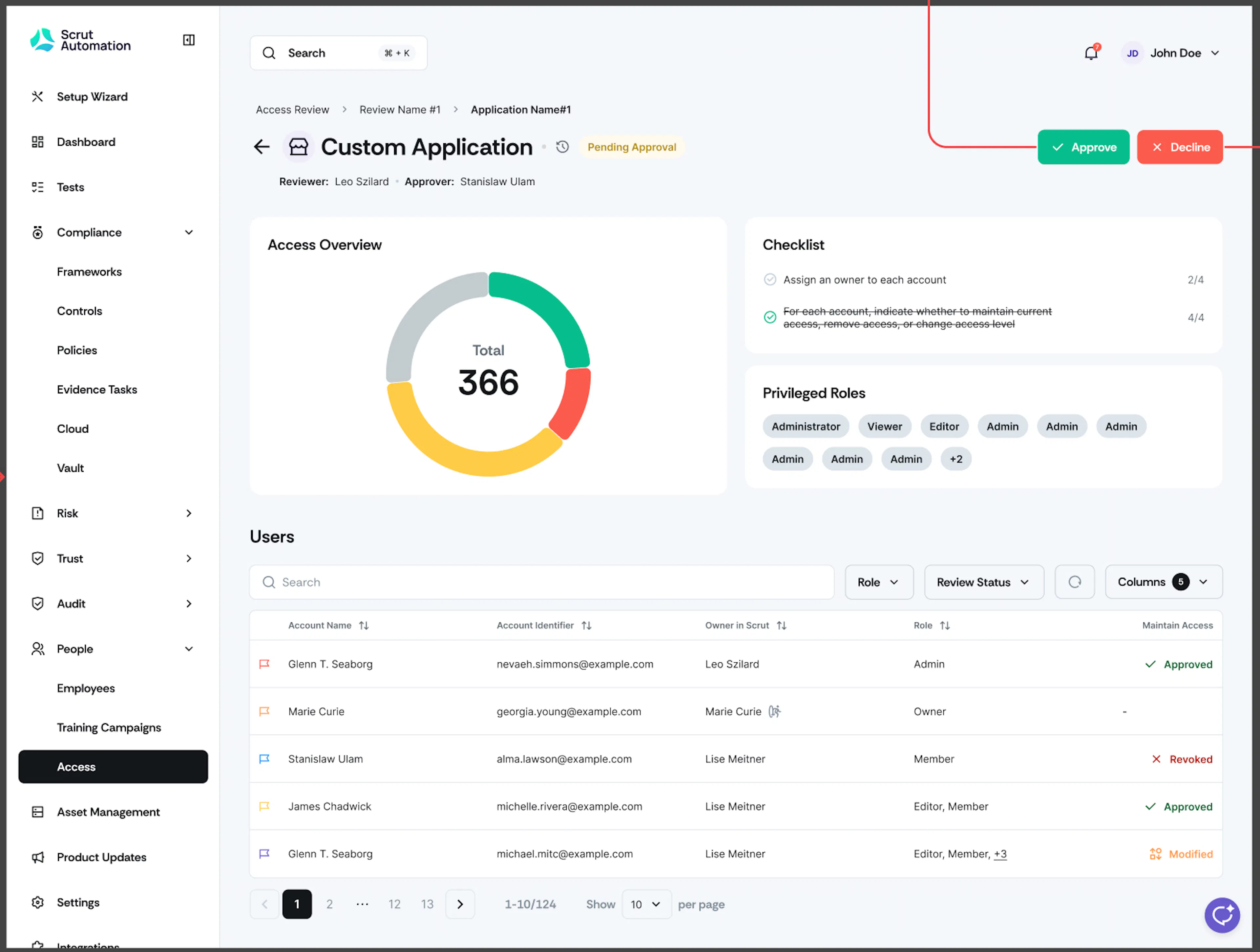
Scrut now includes a Send for Approval button inside Access Reviews so reviewers can submit each application independently when it’s ready, instead of waiting for the entire review cycle to finish.
- Approvers receive a notification and can Approve or Decline with comments.
- A decline returns the application to the reviewer for correction and resubmission.
- Every send, approve, decline, and comment is logged for traceability.
Learn more: Conduct an Access Review
Schedule residual risk reviews after treatment is complete
Risk programs often mark a risk as treated once residual risk is recorded, then lose the cadence for reassessment. Teams also struggle with sequencing: adding residual risk too early while mitigations are still open, or trying to add mitigations after residual risk has already locked the record.
Scrut’s risk timeline guides an identified or open risk through treatment.
- You cannot add a mitigation task after residual risk is recorded.
- You cannot add residual risk while mitigation tasks remain open.
- When residual risk is saved, the risk moves to a treated state and treatment strategy, inherent risk, and residual risk fields are locked.
- Risk owners can then set a review schedule: annually, biannually, quarterly, monthly, a one-time custom date, or never.
- When the review date arrives, the risk moves to a monitor state.
- Choosing Review Risk unlocks the assessment fields so the team can reassess before locking treatment again.
Learn more: Risk Assessment Workflow
Scope Questionnaire Autofill to the right business entity’s documents
Organizations with multiple products, business units, or subsidiaries often answer security questionnaires from a single shared document pool. Autofill then pulls policies that belong to the wrong entity, which creates contradictory answers and extra cleanup.
Scrut now adds entity scoping across Vault files and Questionnaire Automation.
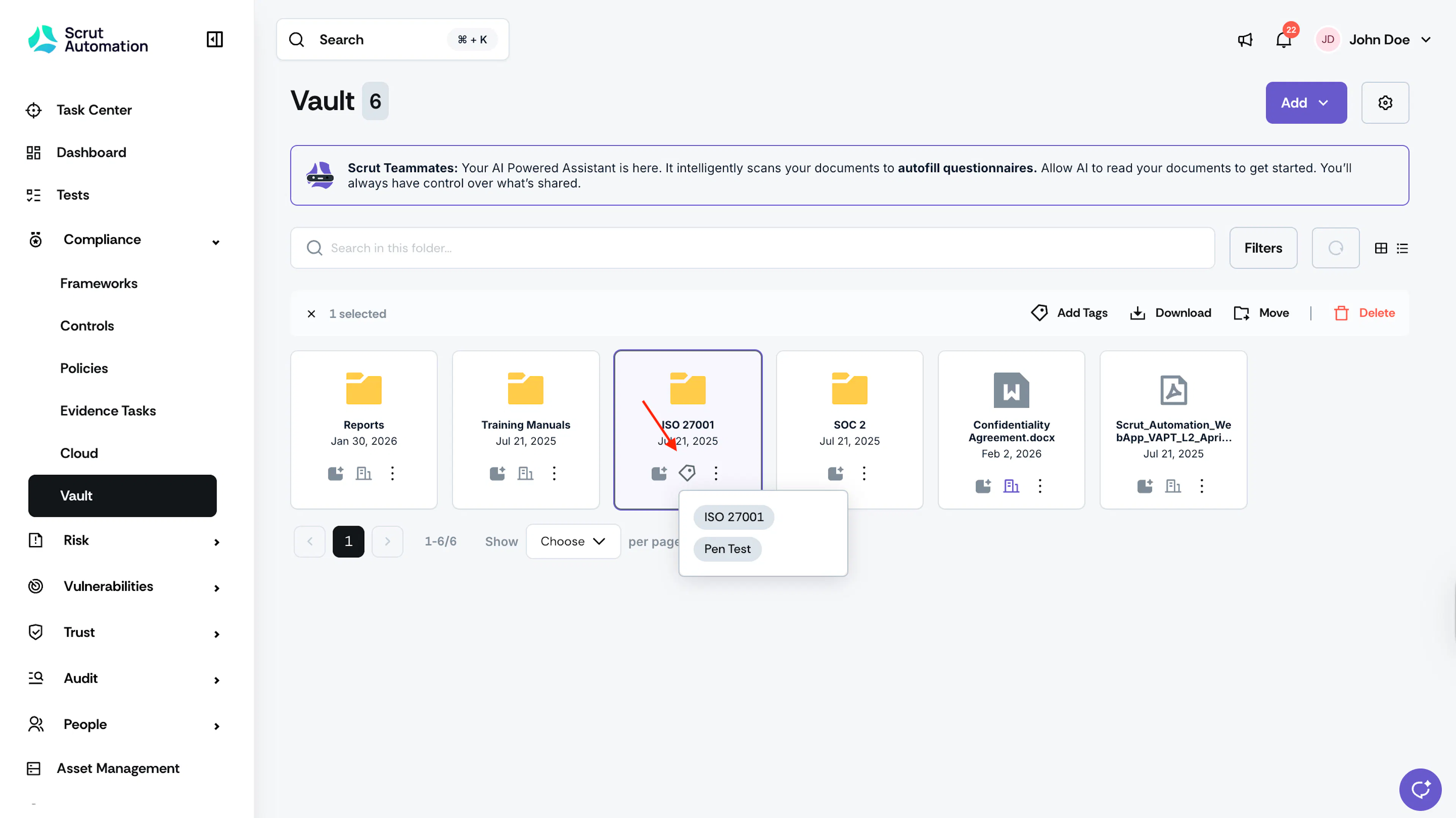
- You can now assign Vault files to specific entities
- Select entities when creating or editing a questionnaire
- Existing content defaults to organization-wide scope
Autofill then uses only entity-matched documents and policies, shows a warning when no matching entity documents exist, and offers an AI Readability toggle to control policy ingestion during Autofill.
Learn more: Manage Tags in the Document Vault
Other Updates
- Remediation autofill in Jira tickets: When you create a Jira ticket for a failed test, Scrut Teammates intelligently auto-populates the best available remediation steps, so you get clearer, more contextual fixes with less effort. Navigate to Cloud → Failed Tests → Create Jira Ticket to see the enhanced Jira ticket creation experience.
- Enriched third-party scan results: Third-party scan findings now surface the Common Vulnerability Scoring System (CVSS) score, last scanned date, a complete treatment plan, and the full list of affected resources in the finding details page.
- Assign a risk to multiple departments: Risk Department supports multi-select (mitigation-task Department remains single-select);
- Assign multiple assignees to artifacts in the Audit module: Findings, requests, and corrective actions support multiple assignees with one primary owner.
- Trust Vault attaches only published policies as PDF and prompts users to preview and sync when a new version is published.
- At the start of each recurrence period (monthly, quarterly, bi-annually, or annually), recurring policy or evidence tasks move to Needs Review regardless of when the prior period’s evidence was uploaded.
- Cloud Test Resources support bulk actions for faster remediation and ownership updates.