

July 2026
In this release
Scrut’s July release connects Scrut to the AI tools your team already uses, brings Shadow IT into a governed inventory, and makes audit records more precise.
- Scrut MCP connects live compliance data to Claude Code, Cursor, ChatGPT Codex, and other MCP-compatible apps.
- Track and manage your Shadow IT applications and move them into a formal inventory.
- Completed audits lock a point-in-time snapshot, so a report downloaded later still matches what was true at completion.
- SoA exports carry Document Reference and Implementation Details.
- Policies and evidence tasks clone with their mappings intact, and Tenable findings import into the vulnerability queue.
Key Features & Enhancements
Introducing Scrut MCP: Bring compliance work into your AI apps
Compliance work today spans multiple surfaces. To answer a questionnaire, you copy context out of your GRC tool and paste it into an AI tool. Filing evidence involves managing documents in Google Drive or similar and reuploading them to your GRC tool later. Fixing a failing cloud test meant switching from your GRC platform to Terraform, Pulumi, or another infrastructure-as-code repo to find the context needed to make the fix.
Scrut MCP connects Scrut directly to the MCP-compatible AI apps you already use, such as Claude Code, Cursor, or ChatGPT Codex.
- Ask plain-language questions and get sourced answers pulled from your live compliance data, without opening Scrut separately.
- Draft questionnaire responses grounded in your actual policies and evidence, with sources cited and gaps flagged instead of guessed.
- File evidence directly from your AI app, recorded in Scrut's audit log and tied to your account.
- Bring a failing test's remediation context into the same environment where the infrastructure fix needs to happen.
- Keep every connection scoped to your existing Scrut role and permissions.
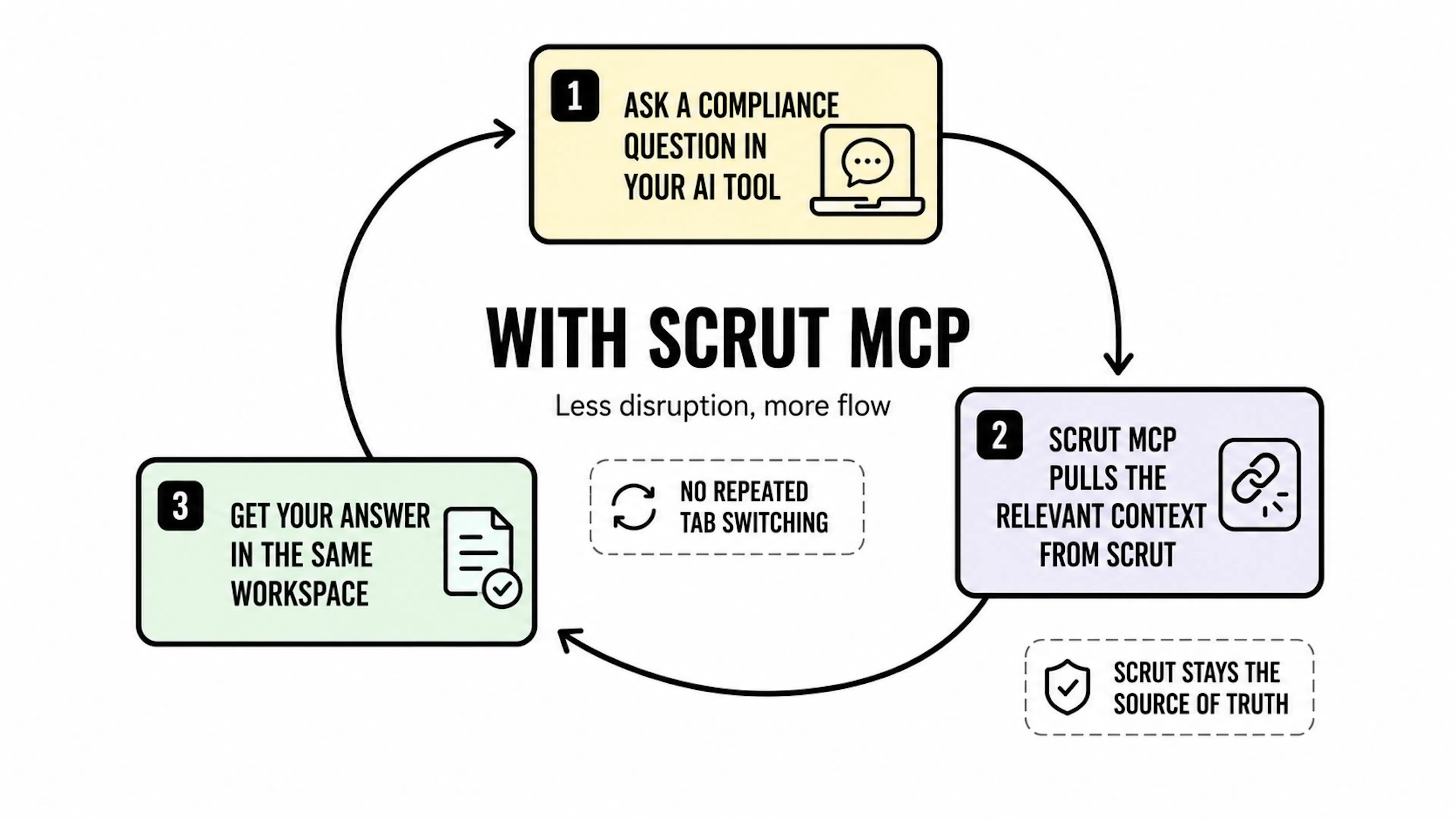
Learn more: Connect Scrut MCP
Discover and manage Shadow IT applications
Unsanctioned SaaS and desktop applications are hard to inventory, yet frameworks such as SOC 2 and ISO/IEC 27001 expect organizations to have an updated inventory of all applications in use. Discovery alone is not enough; teams need ownership, restriction, and evidence that unknown apps moved into a governed state.
Scrut adds an Application Governance experience under People → Access Reviews → Applications with Managed, Discovered, and Restricted apps. Assign an application owner and take actions such as ignore or restrict, individually or in bulk. The inventory covers both SaaS and desktop applications.
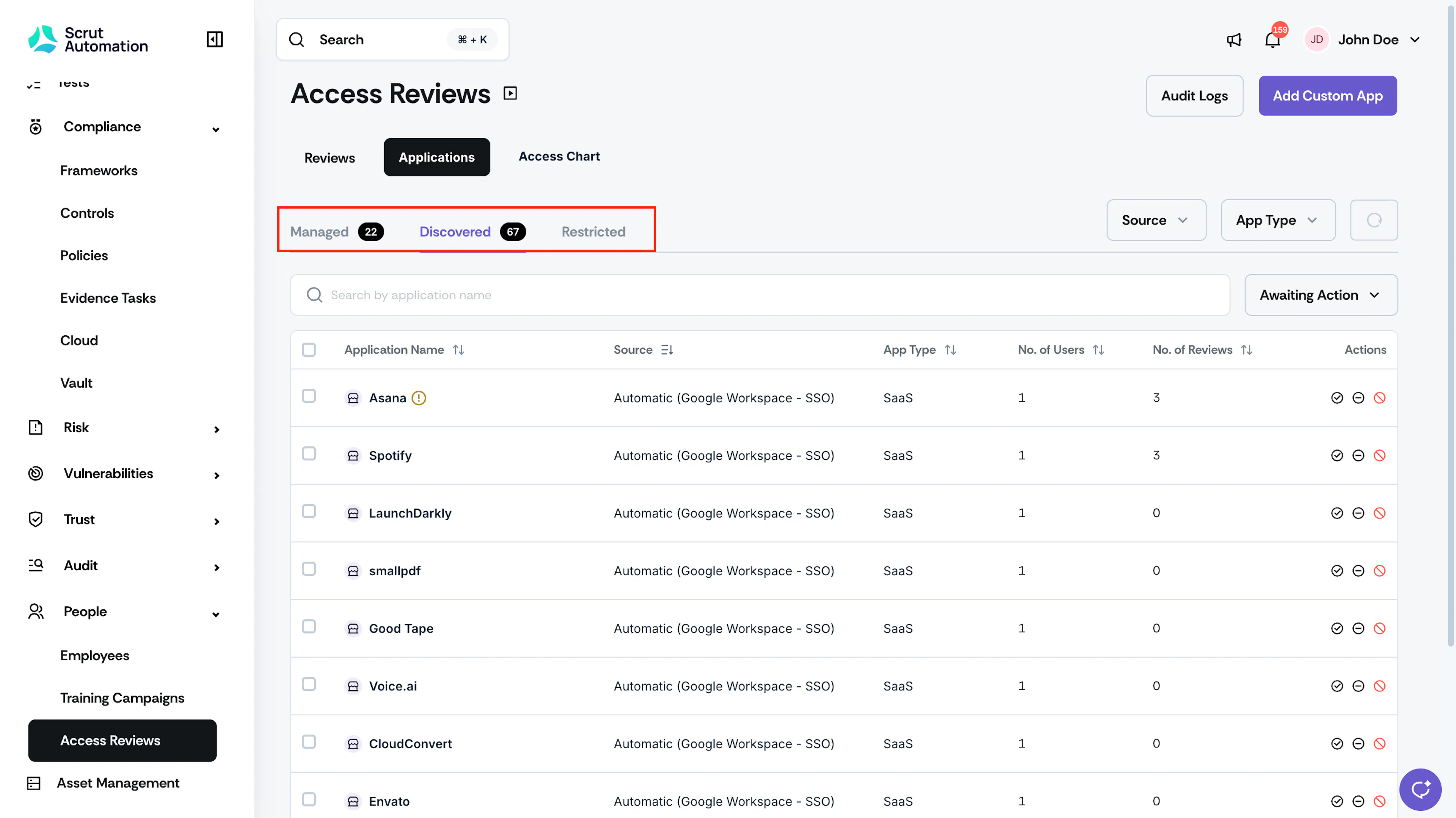
Learn more: Quick start guide: Shadow IT
Clone a policy or evidence task without re-linking every control
Compliance teams often need several policies or evidence tasks that share the same control and requirement mappings but differ in title, entity, or content. Recreating each artifact through the full add flow and re-linking every mapping is slow and easy to get wrong.
Scrut now supports one-click clone from a policy or evidence task detail page. The clone has the same control and requirement mappings as the original artifact. Reviewers update title, entity, or content on the copy while mappings stay intact.
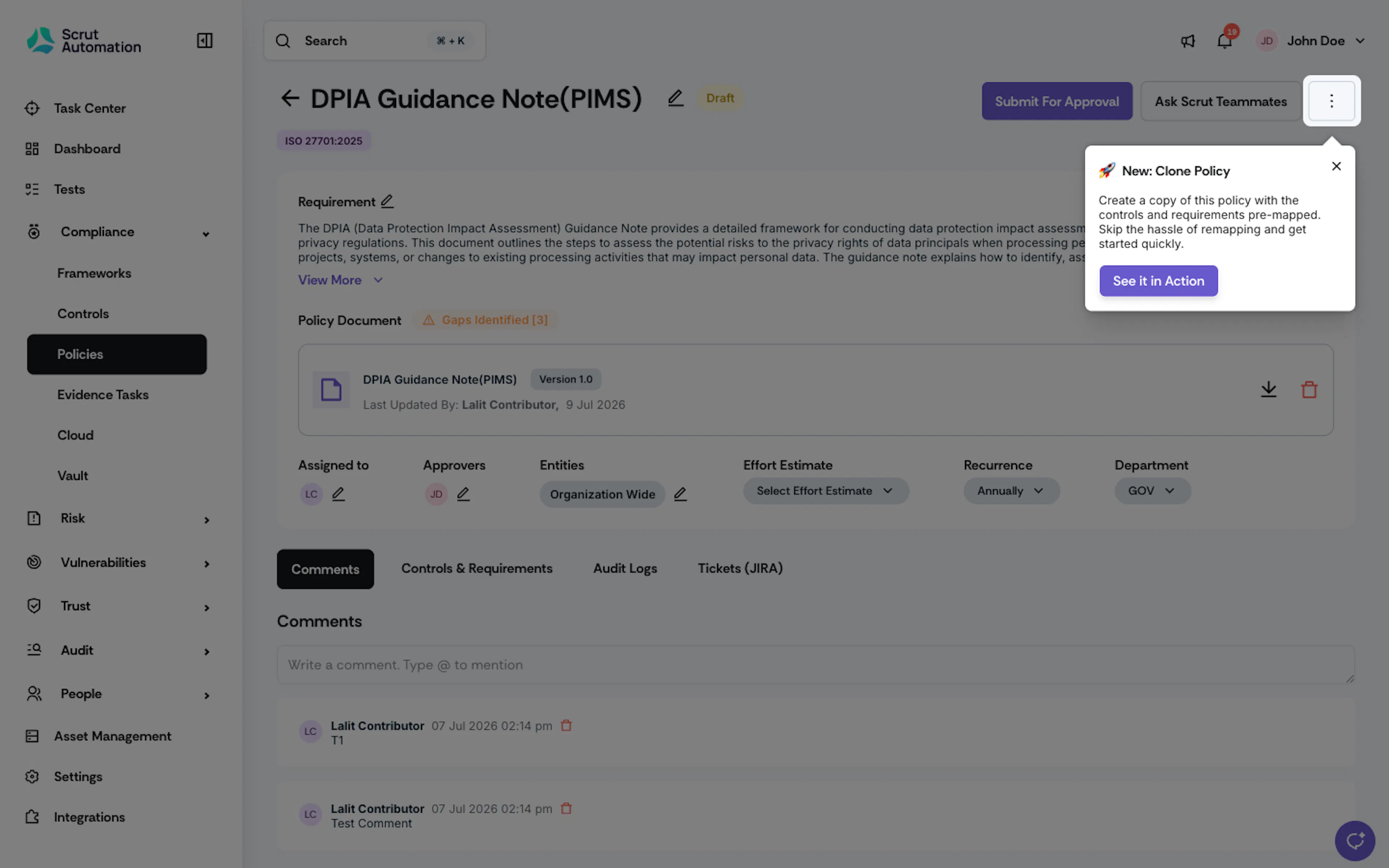
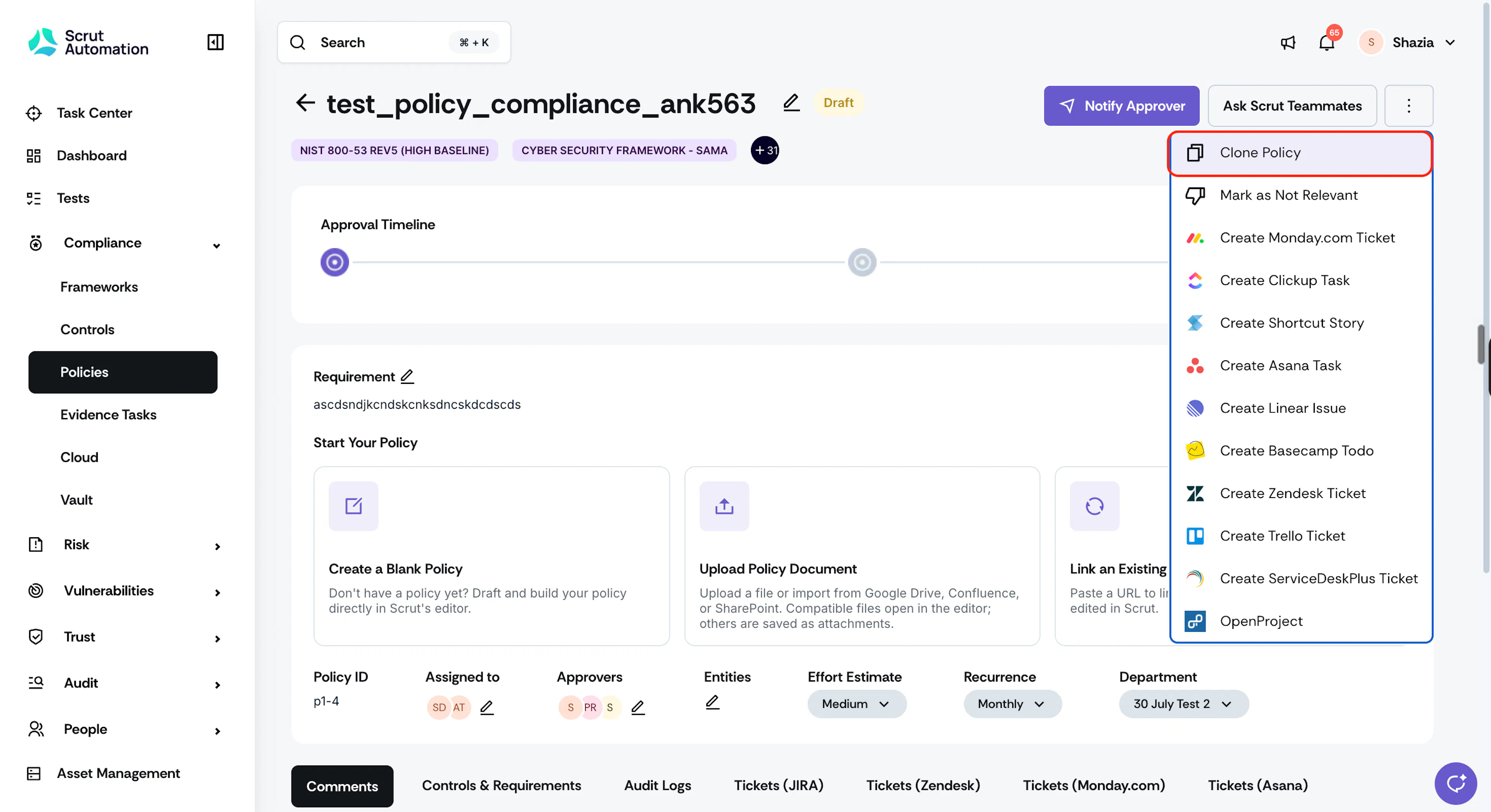
Learn more: Clone a policy or evidence task
Auto-fetch vendor compliance documents
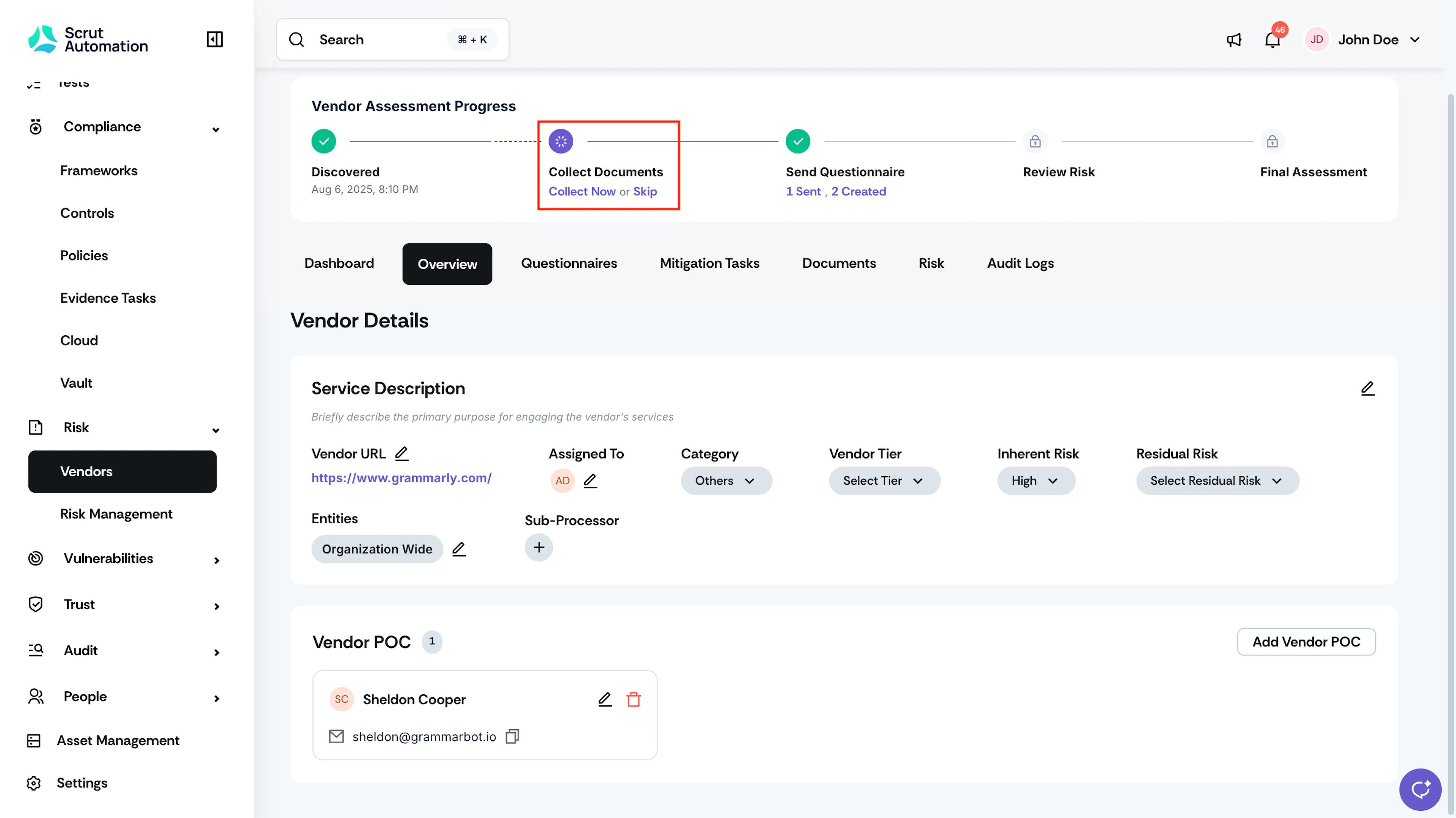
Vendor assessments usually start with nothing more than a website URL, and from there the real work begins: tracking down the vendor’s Privacy Policy, Trust Center, security pages, and then pasting each link into the vendor assessment module in your GRC tool.
Scrut Teammates now automatically discovers vendor compliance documents as part of the vendor assessment workflow. Teammates surfaces relevant compliance pages such as the Privacy Policy, Trust Center, security page, and subprocessor list, right within the Vendor → Documents tab. You can then review and approve or decline the auto-fetched documents, as needed.
Learn more: Auto-fetch Vendor Documents
Preserve audit data at the point of completion
Compliance is continuous, but audits are a point-in-time record. Once you mark an audit complete, its policy, evidence, and test completion percentages should reflect the state your program was in at that moment, not how it evolves afterward. When your live data keeps updating requirements or frameworks, a completed audit that showed 90% coverage can later appear to show a much lower number, even though nothing about that audit's outcome has changed. This makes historical audits look inaccurate and forces you to manually reconstruct past reports to explain what was actually true at the time.
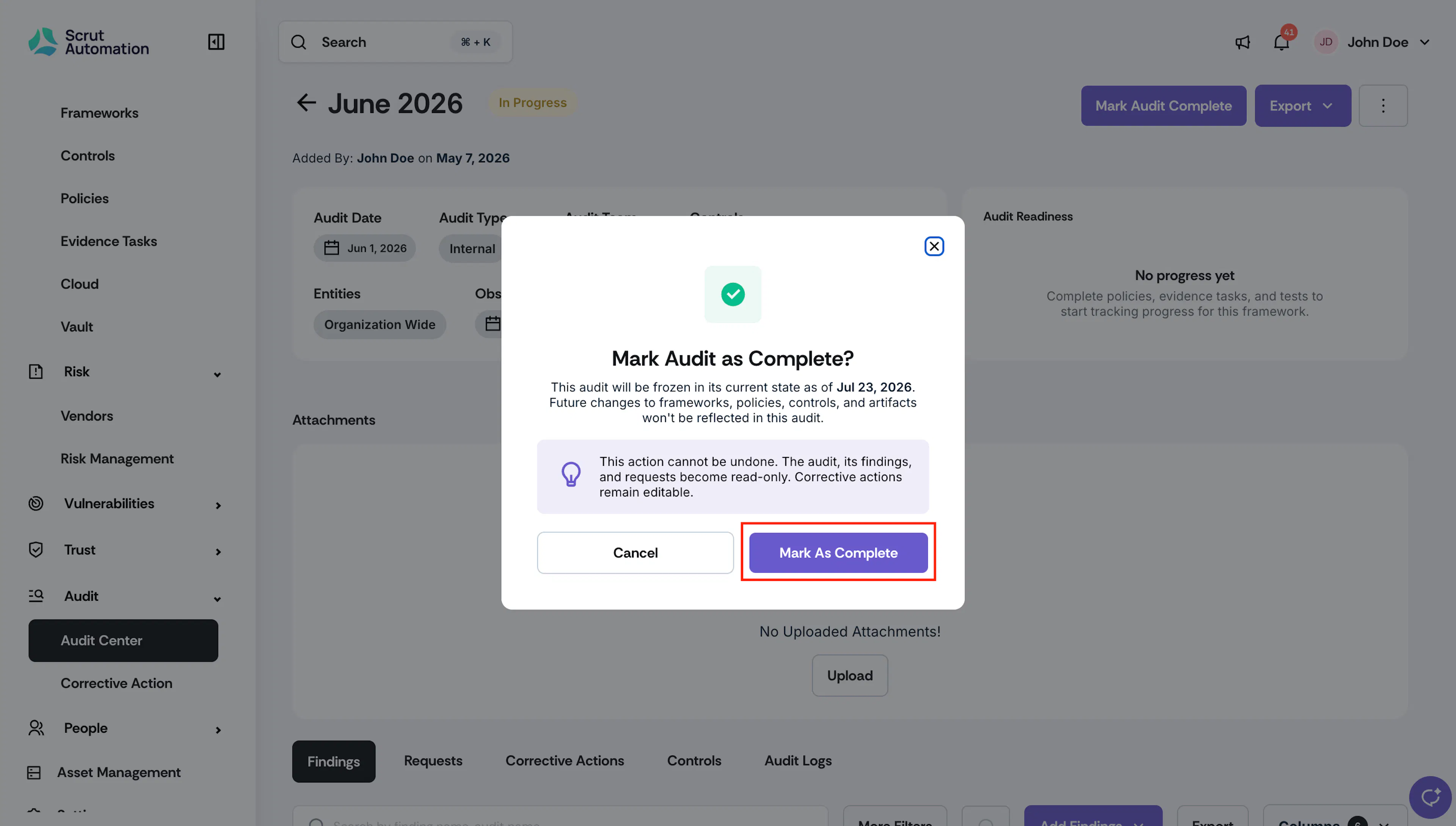
Scrut now preserves a completion snapshot the moment an audit is marked Complete, locking its dashboards and percentages at that point in time.
- Shows the exact compliance state at completion when you revisit or download a completed audit, not today's live state.
- Ensures downloaded audit reports always match what was true at completion.
Learn more: Mark an audit complete
Download SoA with document references and implementation details
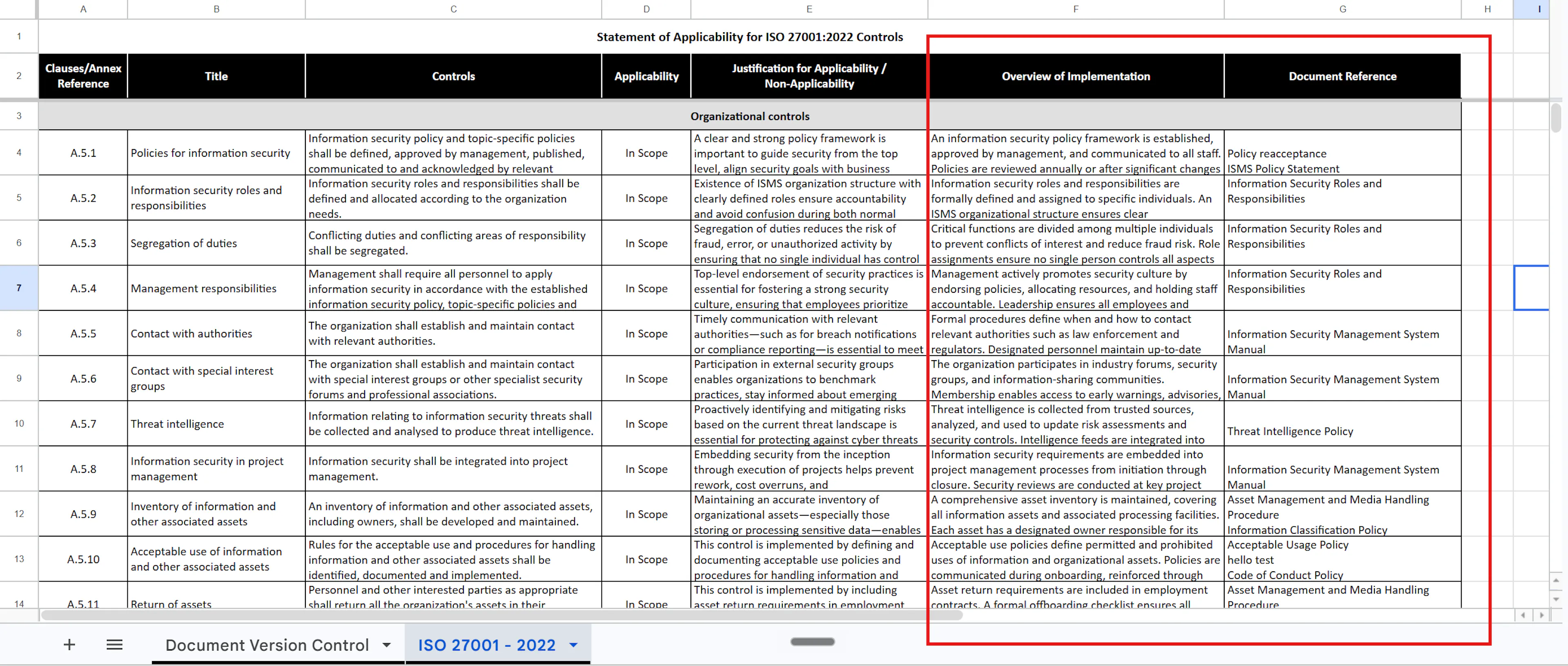
A Statement of Applicability (SoA) is useful only if reviewers can see which document backs each applicable requirement and how the organization implements it. Without those columns, teams have to cross-reference policies and maintain implementation notes in other documents outside the exported SoA.
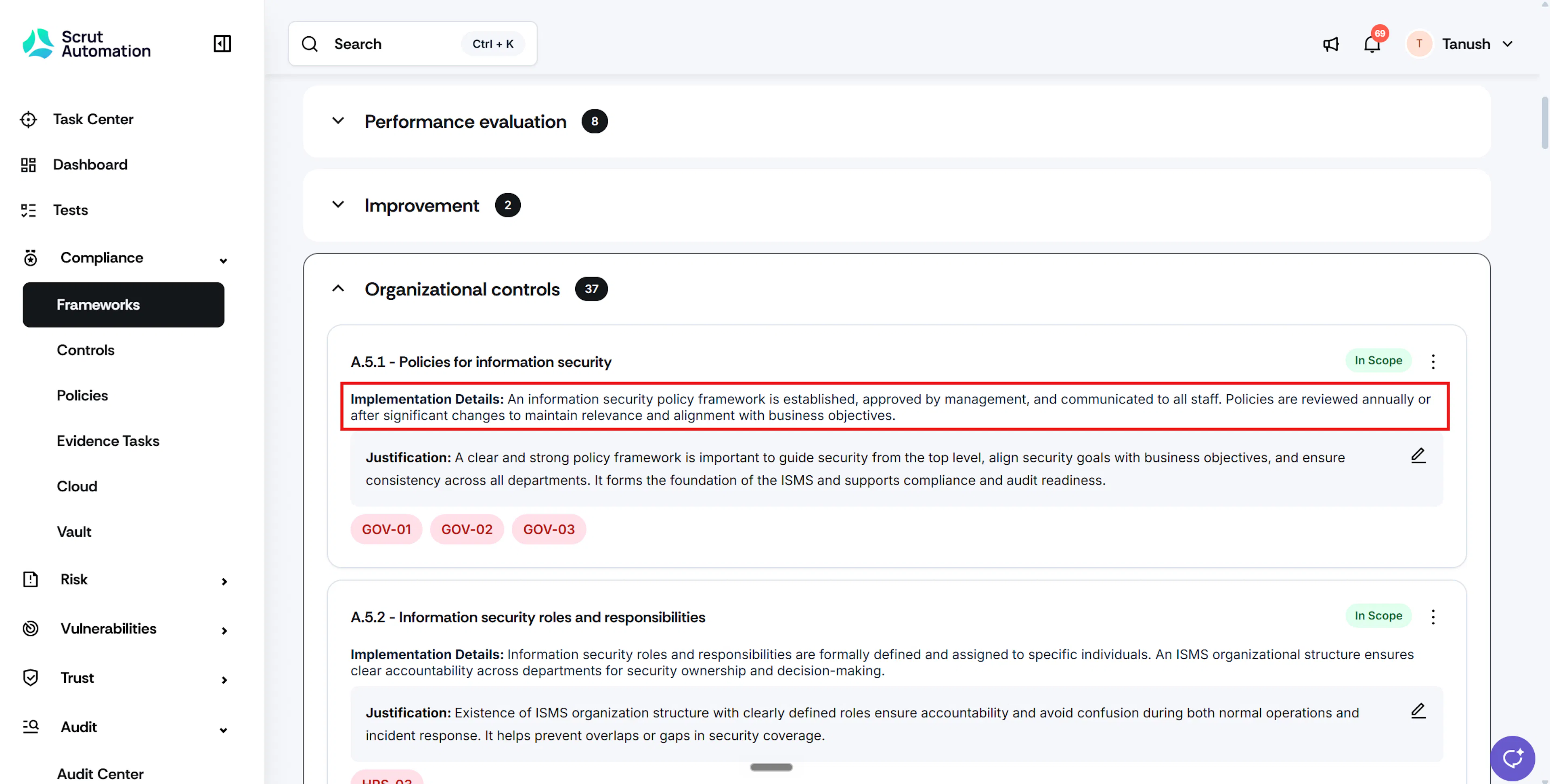
The SoA you can download in Scrut now includes a Document Reference column auto-fetched from policies linked to framework requirements, plus an Implementation Details field captured in the platform and included in the export. Open a framework that supports SOA under Compliance → Frameworks to update implementation details on requirements.
Learn more: Download SoA for ISO frameworks
Import Tenable vulnerability scan findings
Vulnerability findings lose urgency when they stay trapped in the scanner console while compliance owners work in a different system. Without an import path, findings cannot feed compliance reporting, evidence collection, or audit prep.
Scrut now supports importing third-party scan findings from Tenable (previously Nessus) into the Scrut vulnerability workflow. Security and compliance teams can triage imported findings alongside other vulnerability work already managed in Scrut.
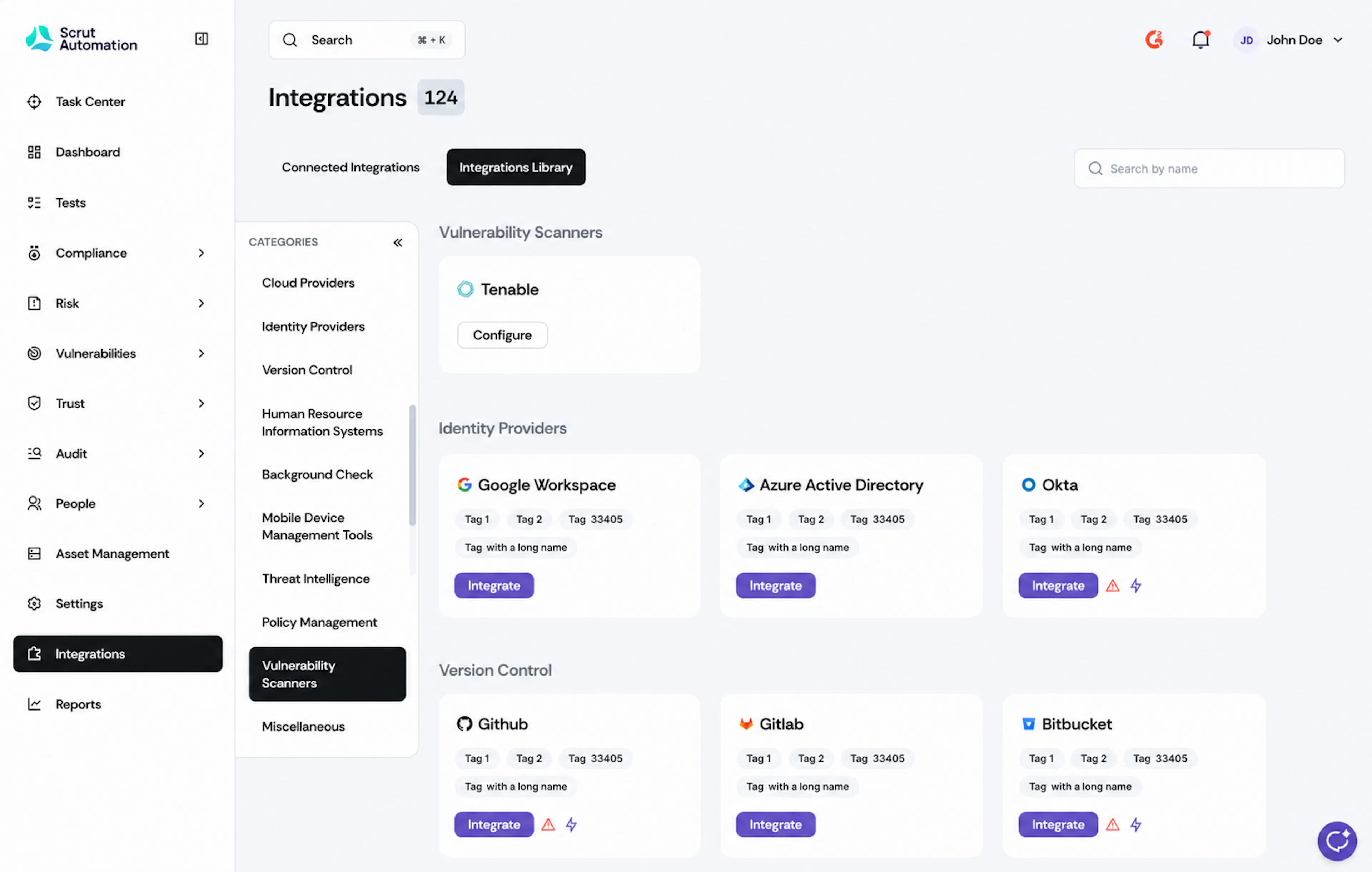
Learn more: Integrate Tenable
Other Updates
- Essential Eight Maturity Model Level 2 mapping updated from the November 2022 guidance to the Australian Cyber Security Center November 2023 release, including fuller Application Control requirements.
- ISO 9001:2015 mapping refreshed for cleaner alignment between quality-management requirements and controls or evidence.
- Teammates Chat now references your Answer Library and Trust Vault in addition to policies and Vault documents.
- Evidence Automation is available for eligible accounts. Contact your CSM to check eligibility. For accounts with Evidence Automation, add or remove automated tests as automation sources on an evidence task.
- Vendor inherent and residual risk ratings now include a new tier, “Critical,” above High for a four-tier classification.
- Attach audit scope and audit plan documents to the audit summary.
- Trust Vault now positions your organization as the Consent Manager under DPDPA (India's Digital Personal Data Protection Act 2023). Visitors are required to accept your organization’s ToS and privacy policy while sending an access request or subscribing to updates.
- Customize your Risk Register table layout by choosing column order and default column visibility.
- Configure the Add Risk form by choosing which default and custom fields appear, and which are mandatory.
- Link an existing Monday item by ID or URL to a Scrut task, sync attachments (existing and later additions) to the evidence task, and keep ticket recreation aligned when statuses change.
- Approve multiple policies in one single action. Navigate to Compliance → Policies → All Policies, select the policies you want to approve, and click Policy Actions → Approve.